
Hello NetBird Community!
April was a busy one. We shipped CrowdSec IP reputation for the reverse proxy in v0.69, ran head-to-head benchmarks against the brand-new Cloudflare Mesh, and dropped three new self-hosting guides covering Nextcloud, PiKVM, and AdGuard Home. Let's dive in.
CrowdSec IP Reputation in the Reverse Proxy (v0.69)
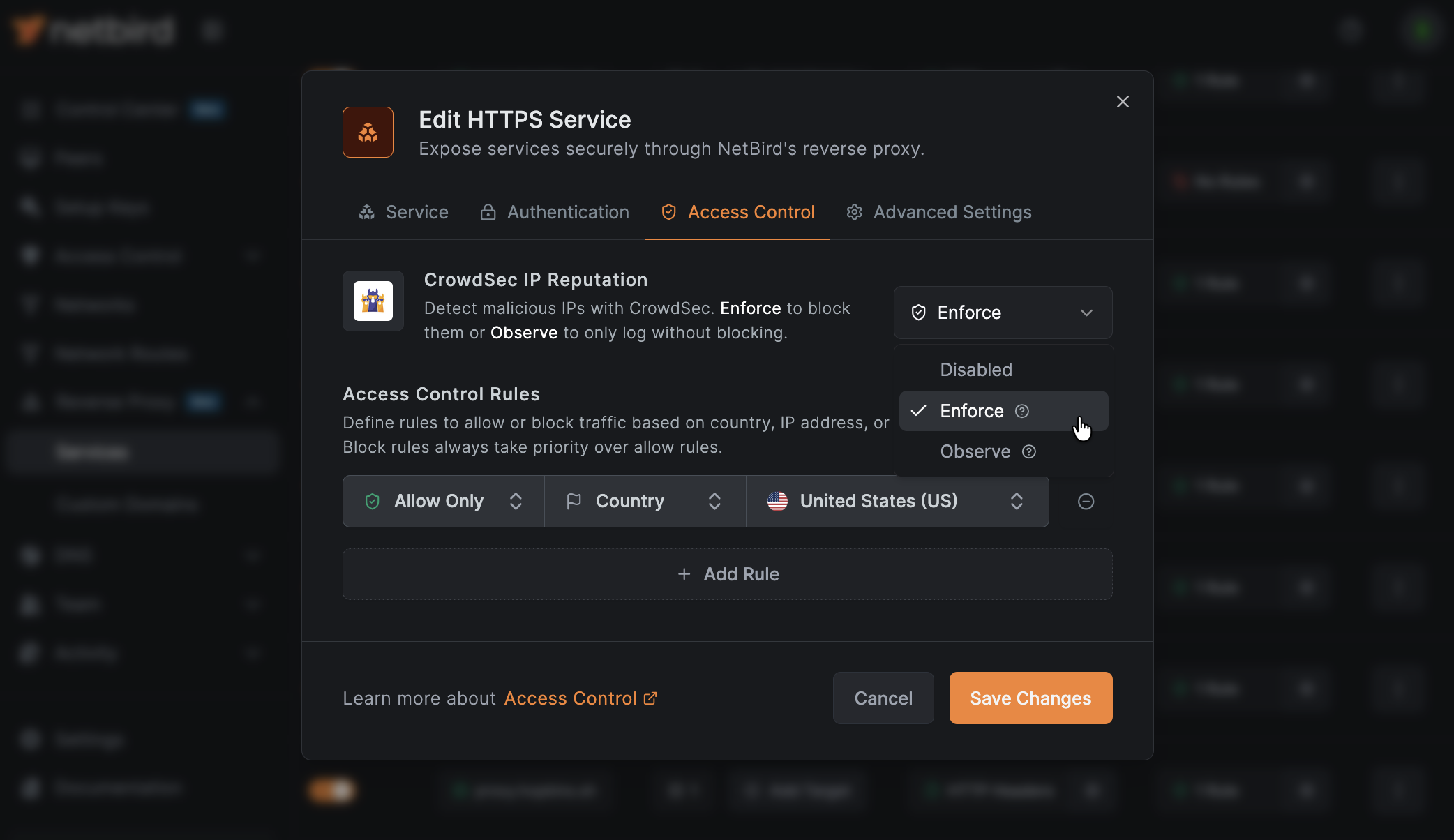
The reverse proxy keeps picking up new powers. NetBird v0.69 integrates CrowdSec IP reputation so the proxy can block traffic from known-malicious IPs before it ever touches your backends. Pair it with the CIDR and country-based access rules from v0.67 and you have a layered, edge-level defense without bolting on a separate WAF.
The integration ships with three modes so you can roll it out carefully:
- Off: checks disabled (the default)
- Observe: decisions are logged but traffic is still allowed, which is great for tuning before you turn anything on
- Enforce: bad traffic actually gets blocked
Observe-mode verdicts show up directly in the reverse proxy event log so you can validate before flipping the switch. Reputation lookups happen in memory on every connection, so checks stay fast on the hot path.
This release also adds PCP support for better P2P connectivity, a smarter macOS routing model, and a handful of client and management improvements.
A week later we followed up with v0.70, a smaller maintenance release covering refreshed Windows and macOS installer signatures, systemd-resolved and firewalld fixes, configurable PAT rate limiting, and a round of stability work across the client and management.
Full release article here. Full v0.70 changelog on GitHub.
Discussion-first GitHub workflow
We've changed how bug reports and feature requests work on the NetBird repo. New reports now start as GitHub Discussions, get validated by our team, and confirmed problems get promoted to Issues.
Why? 1,400+ open issues meant real bugs were getting buried under duplicates and stale reports. The Issues tab is now a curated list of validated work being actively worked on, and your upvotes on feature requests actually feed into prioritization.
Three categories to know: Issue Triage for bugs, Ideas & Feature Requests for features, and Q&A / Support for setup and config questions.
Learn more: Knowledge Hub article
Cloudflare Mesh vs NetBird vs Tailscale: Performance Compared
Cloudflare dropped Cloudflare Mesh and the internet had a lot of takes. So instead of speculating, we tested it. We set up real machines across AWS, GCP, Hetzner, and residential networks in Europe, and ran benchmarks against NetBird, Tailscale, and Cloudflare Mesh under matching conditions.
The short version: for regional and same-country connections, peer-to-peer networks like NetBird are 2-5x faster than Cloudflare Mesh thanks to direct WireGuard tunnels. On long international routes with poor direct peering (think Japan to Europe), Cloudflare's global backbone wins big to data center endpoints. NetBird and Tailscale perform near-identically across the board.
If you want the actual numbers and the methodology, the full write-up is worth a read.
Learn more: Knowledge Hub article
Self-Hosting Nextcloud with Docker and NetBird
If you want your own private Google Workspace or iCloud replacement, Nextcloud is the answer. We published a full guide on setting up Nextcloud All-in-One on Ubuntu Server with Docker, getting storage sorted out (Docker volumes, NFS, or SMB), and exposing it securely through NetBird's built-in reverse proxy with automatic TLS.
No port forwarding, no Nginx configs, no Cloudflare Tunnels. Just install the NetBird client on the Nextcloud host, point a domain at it, and you're good to go.
Learn more: Knowledge Hub article
NetBird on PiKVM: Out-of-Band Access from Anywhere
PiKVM democratized remote KVM-over-IP, but its read-only filesystem makes installing extra software a non-trivial exercise. Our new guide walks through using a tmpfs overlay and the AUR package to install NetBird cleanly, so you can reach the keyboard, video, and mouse of a remote machine even when it's totally unreachable through SSH.
This is the missing piece for homelab admins who want a true out-of-band path to their servers without exposing IPMI or BMC interfaces to the public internet.
Learn more: Knowledge Hub article
Use Local AdGuard Home Anywhere with NetBird DNS
AdGuard Home is one of those self-hosted services that, once you have it running, you can't go back. Network-wide ad blocking, tracker filtering, and full visibility into every DNS query on your network. The downside used to be that it only worked while you were at home.
This guide shows how to configure NetBird's DNS nameserver feature to route every device's DNS queries through your home AdGuard Home instance. Phones, laptops, anything you own. AdGuard's filtering and dashboards work the same on coffee-shop Wi-Fi as they do at home, with no extra apps or configuration on the client side.
Learn more: Knowledge Hub article
Thank You!
Thank you for being part of the NetBird community. Your feedback, GitHub issues, and ideas continue to shape what we build. If you haven't already, come hang out with us on Slack or star us on GitHub.
Team NetBird
Check out the changelog to stay on top of all the product releases. Follow NetBird on LinkedIn !