
We've changed how bug reports and feature requests work in the NetBird GitHub repository, and this article walks you through the new flow so you know exactly where to post and what to include.
The short version: new bug reports and feature requests start as GitHub Discussions, not Issues. The DevRel team validates them, and confirmed problems get promoted to Issues that engineering can pick up and work on.
Why we changed this
NetBird had over 1,400 open issues. A lot of them were duplicates, stale, or things we couldn't reproduce. Real bugs that affect a lot of people were getting buried, and the team was spending more time triaging than fixing. Not sustainable.
So we restructured. The Issues tab is now a curated list of validated work the team is actively committed to. Everything else starts in Discussions, where the community can weigh in and DevRel can confirm before it turns into engineering work.
This isn't an experimental pattern. Projects like Ghostty and Renovate run this way and it works.
The three discussion categories
When you go to open something in the repo, you'll see three categories in Discussions. Pick the one that matches what you're posting.
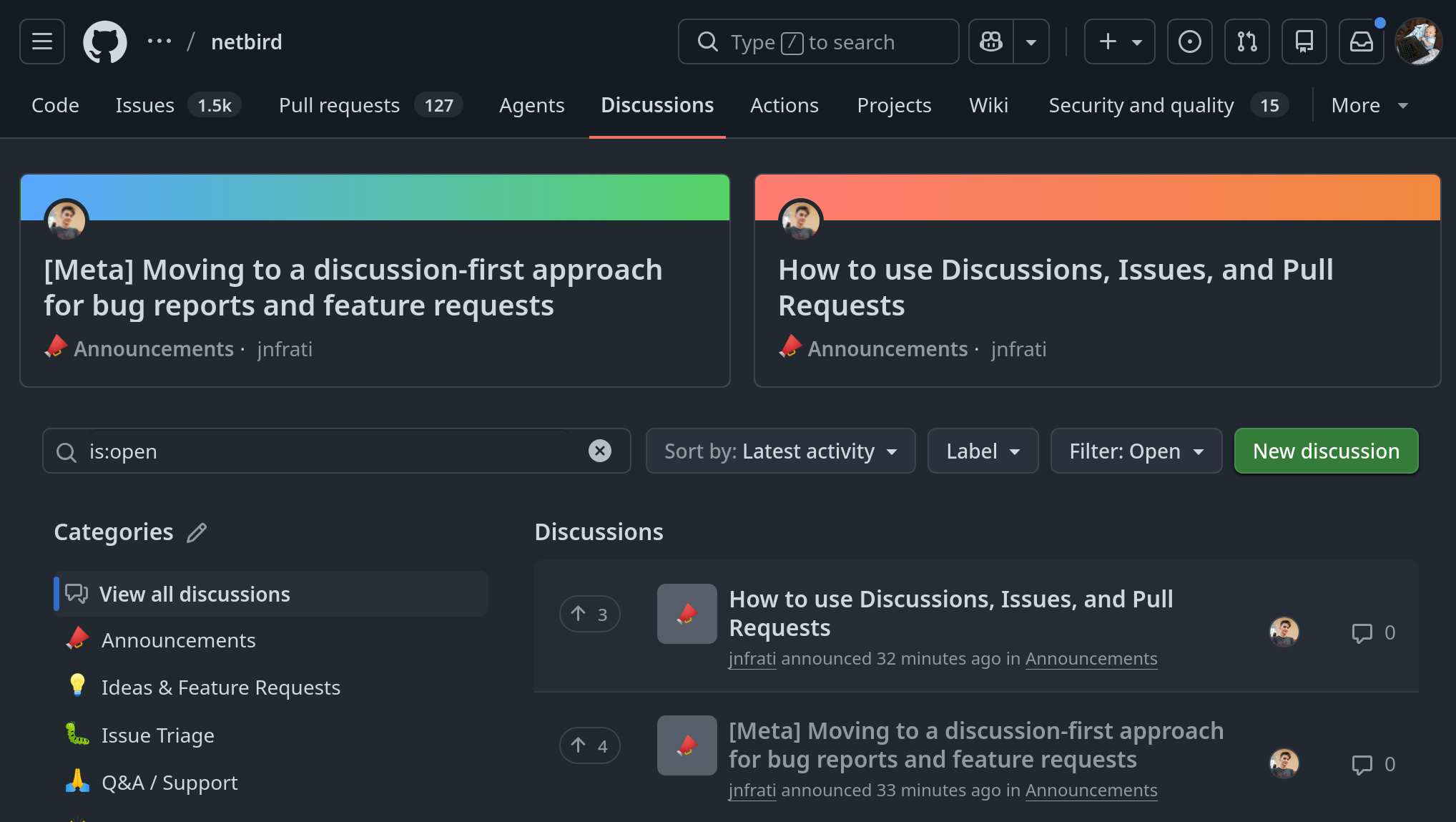
Issue Triage
For reproducible bugs, regressions, and unexpected behavior . If something is broken, this is where it goes first.
If you're not 100% sure whether it's a bug or a config problem, post it here anyway, or start in Q&A / Support and we'll move it over once we've confirmed it's a product issue. Same goes for intermittent issues. Include the trigger, frequency, timing, and any logs you have, and we'll work from there.
Ideas & Feature Requests
For new features, enhancements, integrations , and product ideas. Search first and add your use case to an existing thread when one already exists, that's more useful than ten separate discussions on the same idea.
Community traction matters here. Upvotes, replies, and detailed use cases feed into what gets prioritized. A clear problem statement ("here's what I'm trying to do and why it's hard today") is more valuable than a solution-only request.
Q&A / Support
For setup, configuration, self-hosting, and general usage questions . This is community support, no SLA. If you're on NetBird Cloud and need official support, use the Cloud support channel from the docs instead.
What happens after you post
DevRel triages discussions on a regular basis. For bug reports, that means trying to replicate your issue with the info you provided. If we can reproduce it, the discussion gets promoted to a validated Issue in whatever repo the fix belongs to (core, dashboard, operator, docs, and so on). If we can't reproduce it, we'll comment in the discussion asking for more detail.
For feature requests, we look at community signal alongside roadmap fit. The ones with traction get evaluated for the roadmap.
Issues opened directly without a validated discussion will be closed and redirected to Discussions. Maintainers can still open issues directly when they spot something internally, that's the only exception.
What to include in a bug report
The faster we can replicate your bug, the faster it becomes an Issue and gets fixed. The Issue Triage template walks you through everything, but the essentials are:
- NetBird version. Run on the client. For self-hosted setups, include management, signal, relay, and dashboard versions if you have them.
- Deployment type. Cloud, self-hosted quickstart, advanced/custom self-hosted, or local dev build.
- Operating system or environment. Linux, macOS, Windows, Android, iOS, Docker, Kubernetes, and so on. Include every environment involved in the reproduction.
- Affected area. Client, peer connectivity, DNS, routes, SSH, relay/signal, dashboard, management API, self-hosting, and whatnot.
- Current vs. expected behavior. What's happening, what you thought would happen, and any exact errors or messages.
- Steps to reproduce. The smallest set of steps that reliably hits the bug. For intermittent issues, include trigger, frequency, and timing.
- Logs. For anything connectivity, DNS, route, relay, or self-hosted, include output, or a debug bundle from . Debug bundles auto-delete after 30 days.
Do note: don't paste secrets, tokens, private keys, internal hostnames, or public IPs into a public discussion. Anonymize before posting.
What to include in a feature request
The Ideas & Feature Requests template prompts you for the right things, but the high-value pieces are:
- The problem you're trying to solve. Frame it as "I'm trying to do X, and today that's hard because Y." This is more useful than jumping straight to a proposed solution.
- Your proposed solution. Then describe what you'd like to see, the workflow, the API, the UI, whatever fits.
- Alternatives or workarounds. What have you tried? Why is it not enough?
- Community impact. How many users, teams, or peers are affected? Cloud or self-hosted? Is it blocking adoption?
- Examples from other tools. If something else solves this well, link it.
You can also flag whether you're willing to submit a PR or help test, that helps us route faster.
Security stuff
Don't report security vulnerabilities in public discussions or issues. Use the security policy on the repo instead. We'll take it from there privately.
A few practical notes
One repo for all discussions. Everything goes in regardless of which component is affected. You don't need to figure out whether your problem belongs in core, dashboard, operator, or docs, that's our job during triage. When the discussion gets promoted to an Issue, it'll land in the right repo.
Search before posting. A few minutes searching existing discussions and closed issues saves everyone time. If you find an existing thread, add your use case or there, that signal is more useful than a separate post.
The forum is still around. forum.netbird.io hasn't gone anywhere. GitHub Discussions is the primary path going forward, but the forum is still listed as a community option.
**Slack is still good for chatting with the community. For anything that needs to be tracked or that other people might hit later, GitHub Discussions is better because it's searchable and persistent.
What about the 1,400+ existing issues
Not getting mass-closed. Now that we're not drowning in new unvalidated reports, we can actually work through the backlog properly. Some will be moved to Discussions for re-validation, some will get assigned to a maintainer, and some will be closed. This happens gradually, no fire drill.
That's the whole thing. The goal is simple: less noise, more action on the bugs and features that actually matter to you. If you have questions or feedback about the process itself, drop a comment in Discussions and we'll get back to you.