
I've been running a home lab for just about five years now. In that time I've installed, broken, rebuilt, and obsessed over a lot of different self-hosted applications. Some of them I installed once and never touched again. Others have become so core to how I operate that I couldn't imagine not having them running.
This is my list of the 10 that I keep coming back to. Whether your reasons for self-hosting are privacy, convenience, or just because it's fun to tinker, there's something here for everyone. And of course, all of these work great across a NetBird network, which we'll touch on throughout.
1. Vaultwarden - Self-Hosted Password Manager
If you're only going to self-host one thing, make it your password manager. Vaultwarden is a community-maintained open source implementation of the Bitwarden server, which means you get all the Bitwarden client apps - browser extensions, desktop apps, mobile - all pointed at your own infrastructure instead of someone else's cloud.
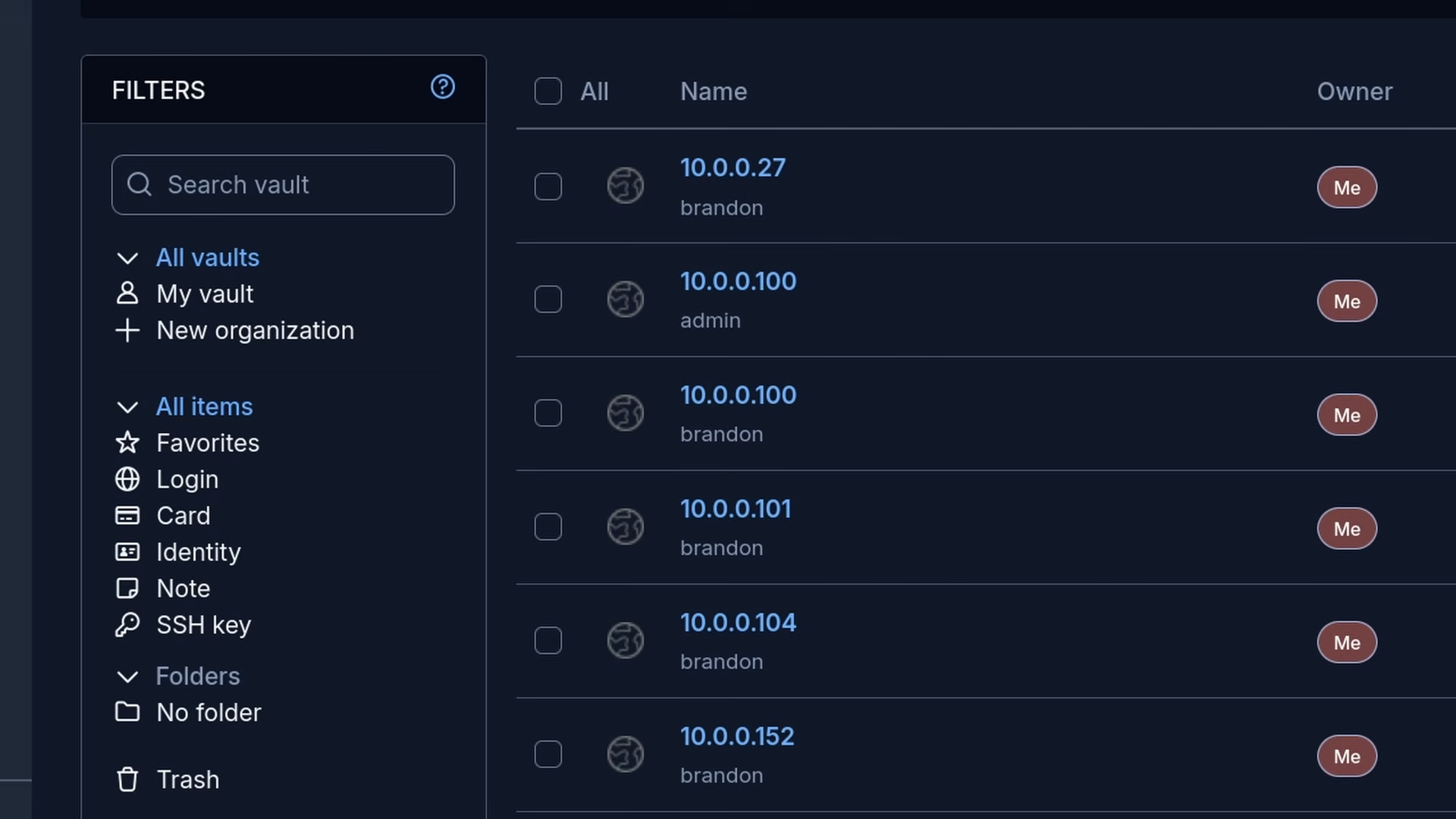
The peace of mind alone is worth it. My Vaultwarden instance is only accessible through my home network or when I'm connected via NetBird, so the data never hits the open internet. You get all the things you'd expect from a password manager: vaults, passkeys, SSH keys, identity storage, secure credential sharing, and a solid password generator built right in.
It's also one of the easiest things to get running. A single Docker container, a reverse proxy if you want HTTPS, and you're good to go.
2. Immich - Google Photos Alternative
Immich is probably the app I recommend most to people who are just getting started with self-hosting. It's a free and open source photo and video backup platform that gives you all the features you'd expect from Google Photos or iCloud, running entirely on your own hardware.
We're talking automatic mobile backup, facial recognition, map view, shared albums, on-device search, the works. The mobile apps are solid and the web UI is genuinely nice to use. If you've got a NAS or a home server with some storage to spare, getting your photos off of Google's servers and onto your own is one of the most satisfying self-hosting wins there is.
Do note it's actively developed and updates come fast. I'd recommend keeping an eye on the release notes when you update.
3. RustDesk - Remote Desktop
RustDesk is an open source alternative to TeamViewer and AnyDesk. It's written in Rust, it's fast, and it works across Windows, Linux, and Mac. If you need to remotely access a machine and you don't have a hardware KVM available, RustDesk is your next best option.
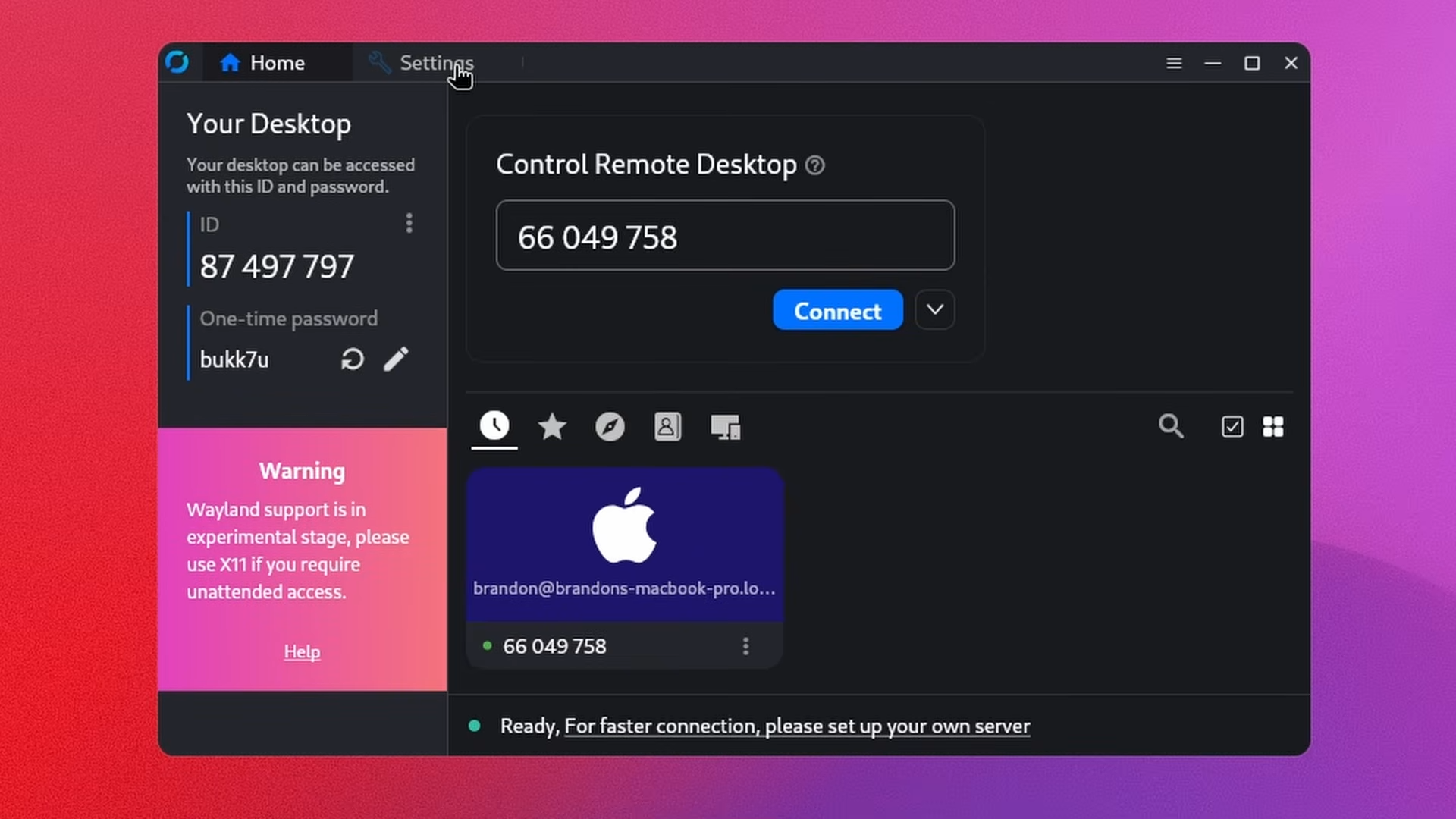
You can self-host the relay server so your traffic never touches third-party infrastructure, which is a pretty big deal compared to the commercial alternatives. The management console gives you a clean view of all your connected devices and it's pretty simple to get up and running.
For anyone managing machines for family members or running a small homelab setup where you need occasional access to a bare metal box, this one is a must-have.
4. AdGuard Home - Block Ads Anywhere
AdGuard Home is a DNS-based ad and tracker blocker, similar to Pi-hole. I'll be real - Pi-hole is more popular and I love it too. But if you're looking for something with a cleaner UI and a simpler setup, AdGuard Home is hard to beat. It's open source, self-hostable, and beautiful.
The real power move here is combining it with NetBird. You can set AdGuard Home as your NetBird DNS server and then any device connected to your NetBird network routes its DNS through your local AdGuard instance, no matter where in the world you are. Coffee shop, airport, hotel wifi, whatever - ads get blocked everywhere as long as you're connected. We have a full video and guide on exactly how to set that up.
Setup is about as simple as it gets. One install, point your router or NetBird at it, and you're blocking ads on every device on your network.
5. Home Assistant - Smart Home Hub
Home Assistant is the gold standard for self-hosted smart home management. The whole idea is to bring all your devices from all your different manufacturers into one place, regardless of what wireless protocol they use or what app they normally require.
Lutron switches, Zigbee bulbs, Sonoff devices, IKEA stuff, it doesn't matter. If it's smart, Home Assistant can probably integrate with it. From there you get a fully customizable dashboard, automations, and an integration ecosystem that's honestly massive.
I just moved into a new house so my Home Assistant instance is a bit bare at the moment, but I'll get it set back up properly. It's one of those apps that gets more useful the more devices you add to it. We also have a dedicated video showing how to set up remote access to Home Assistant using NetBird, so go ahead and check that out.
6. Syncthing - File Sync Across Devices
Syncthing is a continuous file synchronization tool that keeps folders in sync across multiple devices without any central server. Everything is peer-to-peer and end-to-end encrypted. It's been around for years, has over 64,000 GitHub stars, and just works.
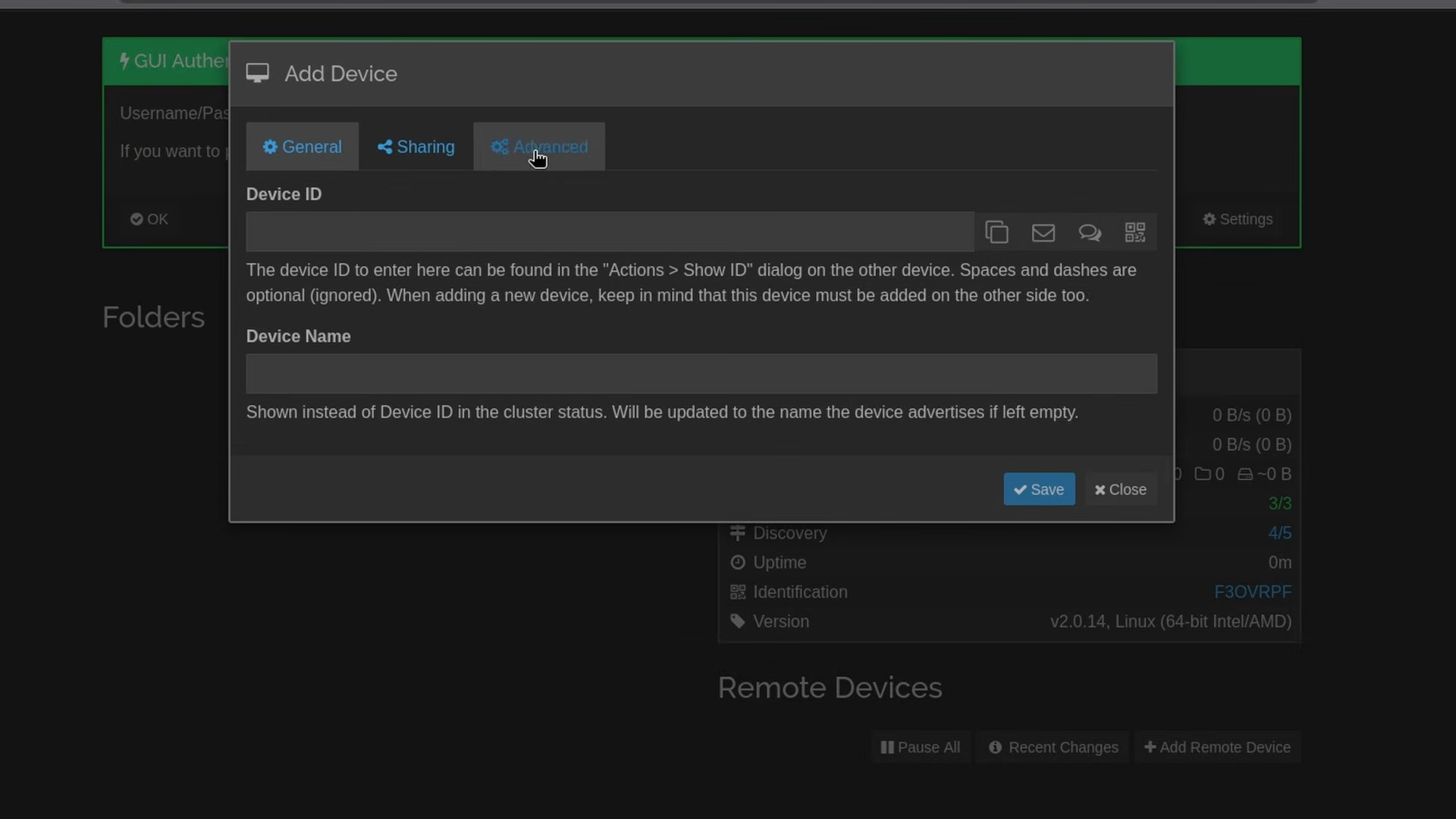
I'll be upfront - I don't use this one every day personally because I use Nextcloud for most of my file sync needs. But Syncthing is the right tool if you want something dead simple and lightweight. Just pick a folder, add your devices, and it handles the rest automatically.
We don't have a dedicated Syncthing video yet, but it's coming and we're going to cover integrating it into a NetBird mesh network so you can sync across sites securely.
7. Beszel - Server Monitoring
Once you start running a bunch of services, you need a way to keep an eye on everything. Grafana and Prometheus are great if you want to go deep, but Beszel is where I'd tell most people to start. It's lightweight, clean, and dead simple to set up.
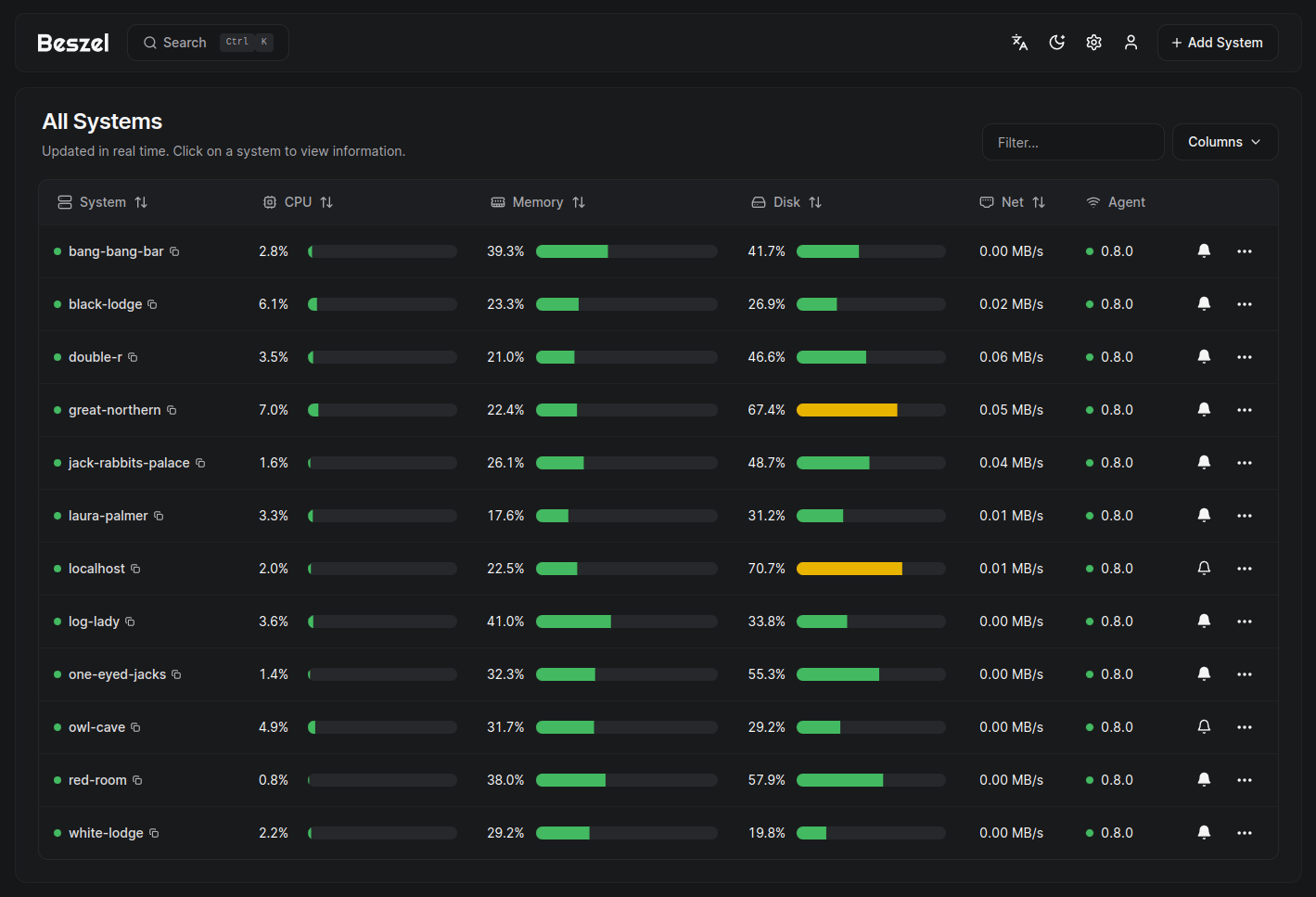
You get CPU, memory, disk, and network stats across all your nodes in one dashboard. It supports alerts, multiple users, Docker container monitoring, GPU metrics, and even automated backups. For most home lab use cases it covers everything you'd need without the overhead of a full observability stack.
Real nice app. Highly recommend it as your first monitoring tool.
8. Ollama - Run AI Locally
Ollama is the easiest way to run large language models locally on your own hardware. You pull a model, run a command, and you're chatting with it in the terminal. From there you can pair it with something like Open WebUI to get a full ChatGPT-style interface running completely locally.
What's great about Ollama is that it integrates with basically anything that has AI capabilities - n8n, VS Code extensions, document tools, you name it. Instead of burning through API credits, you're running inference on your own hardware.
Do note that to run the larger models well you're going to want a decent GPU with a good chunk of VRAM. But even on a modest CPU-only setup there are smaller models that run just fine for a lot of use cases.
9. Jellyfin - Media Server
Jellyfin is what got me into self-hosting in the first place. It's a free and open source media server that lets you stream your movies, TV shows, and home videos to basically any device - Google TV, Apple TV, Xbox, phone, browser, all of it.
You get user profiles, watch history, resume playback, and a library UI that's genuinely pleasant to use. It's fully open source and has no paywalls, no subscriptions, no strings attached. If you've got media sitting on a hard drive somewhere and you want to be able to watch it from anywhere, Jellyfin is the answer.
Pair it with the NetBird reverse proxy and you can stream from your home server to any device in the world without opening any ports. We've got a full setup guide for that.
10. Nextcloud - Google Workspace Alternative
Nextcloud is the one I've used longest and the one I'd recommend most for people looking to replace cloud services at a broader level. It's a full self-hosted cloud platform - file storage, file sync, document editing, calendar, contacts, kanban boards, email integration, and a whole app ecosystem on top of it.
It's based in Germany if you care about that sort of thing, and the all-in-one Docker image makes setup a lot more approachable than it used to be. I use it daily for file sync across my devices and it's been rock solid.
If you're paying for Google Workspace or Microsoft 365 and most of what you actually use is Drive and Docs, Nextcloud is worth a serious look. We have a full setup video on the channel if you want to dive in.
Wrapping Up
There you have it - five years of home labbing distilled into 10 apps. Whether you start with just one of these or try to spin them all up at once (don't, do it one at a time), each of these is going to add real value to your setup.
We'll be putting out dedicated guides for several of the apps on this list that we haven't fully covered yet, so go ahead and subscribe so you don't miss those. With all that, I do hope you have an absolutely beautiful day.
Your Favorite Apps
After I put that list out, I asked you all on Reddit and YouTube what your must-try, must-use self-hosted apps were - and oh boy, was there a lot of them. So I pulled the responses from every source, combined them into one list, and counted them up. These are your must-have self-hosted applications, straight from the community.
1. Paperless-ngx - Document Management
An open source document management system that turns your physical paperwork into a searchable, auto-tagged archive - all the data you don't want sitting in someone else's cloud. Plenty of ways to get documents in, including wiring a scanner straight to it.
2. SearXNG - Private Metasearch Engine
Your very own web search tool - a metasearch engine that aggregates results from a bunch of services while stripping your private data out of requests. No third-party forwarding, no ads.
3. Audiobookshelf - Audiobook & Podcast Server
One I run personally. A really nice interface for streaming and playing back your audiobooks, with easy ways to get ones you've already purchased into your own self-hosted library.
4. Dawarich - Self-Hosted Location History
A self-hosted alternative to Google Maps Timeline. If you want to track your own movements, the UI is comprehensive - trips, calendars, stats, insights, and more. One I'm going to try out for myself.
5. copyparty - Lightweight File Server
A lightweight but feature-rich file server you can run from a single Python file (Docker's available too). Snappy web UI with zip downloads and image previews - great behind the NetBird reverse proxy using our new private services feature.
6. Gotify - Self-Hosted Notifications
A simple server for sending and receiving messages in real time over WebSocket, with an Android client and a CLI. Really popular - over 15,000 GitHub stars. We've got a full video on this over on our German channel.
7. Gatus - Uptime Monitoring
Advanced uptime monitoring along the lines of Uptime Kuma. There's a live demo so you can see the dashboard for yourself - response times, trends, and statistics over time. Simple to use and gives you good data.
8. Forgejo - Self-Hosted Git
The community-driven hard fork of Gitea: repositories, pull requests, and CI - basically your own private GitHub on your own hardware. Great for anyone writing code or automating their home lab.
9. Technitium DNS Server - Pi-hole Alternative
A full, true DNS server and an alternative to Pi-hole or AdGuard Home. If you want full control and every feature you could want, this is a fantastic option. Another one we cover on our German channel.
Technitium DNS Server on GitHub
10. Self-Hosted Email - Mailcow & Stalwart
A trend I didn't expect: plenty of you self-host your own email. I don't trust myself to, but if you're braver, Mailcow got mentioned a bunch, and so did Stalwart - an open source, Rust-native mail server with full email, collaboration, and anti-spam that scales from one node to many.
Mailcow on GitHub and Stalwart on GitHub
And there we have it - the community's must-have list. If there's something here we missed that you think should have been included, let us know. And of course, my personal favorite (I'm biased) is still NetBird - self-host it yourself, or spin up the cloud version and have everything running in minutes.