
Hello NetBird Community!
Since our September newsletter, we've shipped v0.81 with more control over your Reverse Proxy services and a way to reach private apps without admin rights. I also found NetBird in NVIDIA Brev's CLI, so naturally I had to try that out. We'll also get into CrowdSec and giving Grok Bot access to your private services.
NetBird v0.81: Path access, device certificates, and nblink
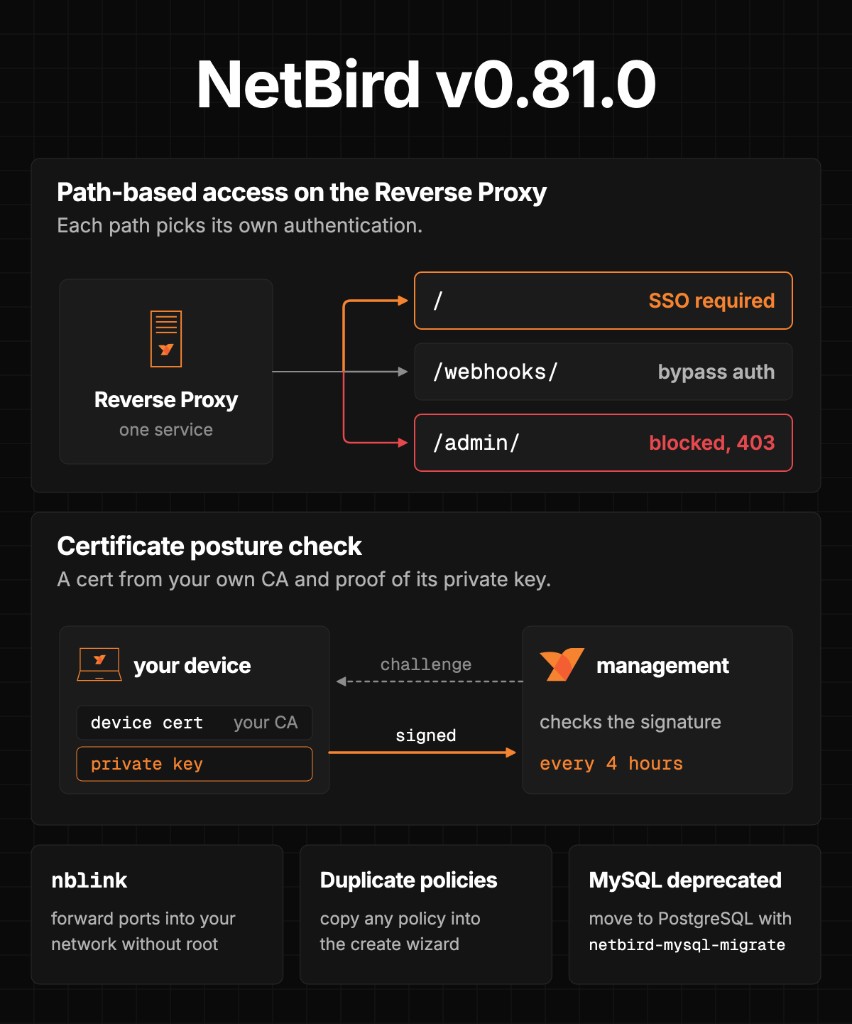
Say you've got an app behind SSO, but its webhook needs to receive requests without going through that login. With v0.81, you can change the access action on supported HTTP targets: keep the service's authentication, bypass it for that path, or block the path entirely. So you can let the webhook through and keep an admin page off the public domain.
Bypass authentication is unavailable for NetBird-Only services and Agent Network targets. Do note that bypassing authentication still leaves your CIDR, country, and CrowdSec restrictions in place. If you run your own proxies, upgrade every instance in the cluster before you start using these actions.
Certificate posture checks let you require a certificate from a CA you trust before a device gets access. The client has to sign a challenge with the private key, so somebody copying the certificate alone won't pass the check. You'll need v0.81 or newer on both management and the client. Mobile apps don't support this, so leave it off any policy your phones need to pass.
Then there's nblink. It's a separate binary that forwards HTTP traffic into your NetBird network without root access or a TUN device, so you can use it on a managed laptop, in a rootless container, or in CI. It runs as an unprivileged process with its own peer identity, and your policies decide what it can reach.
You can also duplicate access policies in the dashboard now. Pretty handy when a policy is almost what you need and you just want to change the group or port.
Read the v0.81 release walkthrough, or try the examples in the nblink docs.
Pick up the patches, too
If you last updated around the September newsletter, go ahead and check the releases since then. v0.80 added proxy rate limiting and fixed how the client handles relay disconnects, along with fixes for Windows clients and identity providers.
v0.81.4 removes trust in compromised eMudhra CA keys and fixes SSH privilege dropping in PKCS#11 builds. Then v0.81.5, released October 26, adds limits and validation to SSH session requests and fixes how resize requests are handled. I do recommend picking up the patches when you update.
If you're self-hosting with MySQL, start planning your move to PostgreSQL. We deprecated MySQL in v0.81, and the v0.82 release candidate removes it. Follow the migration guide before moving to that release line.
And remember to check Traefik and CrowdSec separately. The NetBird dashboard's version indicator doesn't track those updates, so use the maintenance guide when you're updating them.
NVIDIA Brev installs NetBird by default
Somebody pointed me at NVIDIA Brev's CLI, so I went looking. Sure enough, when you register your own machine, it installs NetBird. Their cloud GPU instances come with it already running, too.
For my test, I used an old gaming PC with an RTX 3090. I registered it, connected from another network, and ran a coding model with Ollama. Then I spun up a larger cloud GPU from the same console and gave it the same task.
I go through registration, SSH access, and port forwarding in the video. Do note that Brev Connect enrolls the machine with Brev, so use one that doesn't need to stay connected to your existing NetBird account.
Watch above or read the Brev walkthrough.
CrowdSec protection and a private dashboard
I put together two CrowdSec guides for those of you running your own NetBird deployment. In the first one, we add AppSec protection in front of the NetBird dashboard using an existing CrowdSec setup. I show you how to check that it's enforcing the rules and monitor what gets blocked. We also go through how to get back in if you lock yourself out.
For a browser view of your alerts, decisions, and metrics, we also set up . You can manage CrowdSec decisions from there, so I prefer keeping it private. We run it alongside NetBird as a NetBird-Only service, with its login page off the public internet. This is a community project maintained independently of NetBird and CrowdSec.
Start with CrowdSec AppSec, then set up the private CrowdSec dashboard.
Connect Grok Bot to your homelab
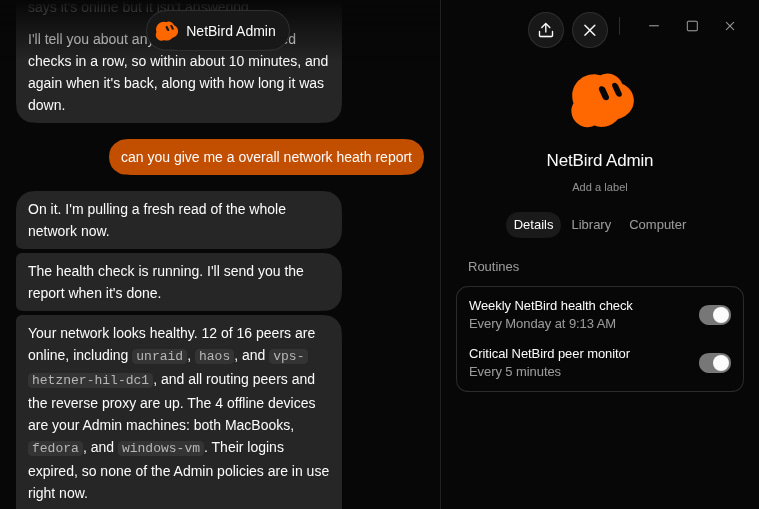
My bots run on a cloud VM, but most of the services I want them to use are sitting at home. I've been using NetBird on that VM to connect the two, with the same groups and policies I use for my other devices deciding what the bots can reach.
You can start with the NetBird Admin bot template to review your network and propose changes for you to approve. I also walk through the setup I used to route an email bot's iCloud Mail connection through my home server. The same approach works for giving a bot access to a private API or a model running on your own GPU.
Read the Grok Bot guide.
Thank you!
Thanks for sending in bug reports, asking questions, and sharing what you're building. Keep those coming in our community Slack, and if NetBird has been useful to you, give us a star on GitHub.
With all that, have a great one!
Team NetBird
Follow the changelog for product releases and NetBird on LinkedIn for more updates.