
One of the more interesting parts of building open source software is finding out where it ends up. A little while ago somebody pointed me at NVIDIA Brev's CLI, and sure enough, under there's a file called . When you register your own machine with Brev, step one of that command is installing NetBird. And it goes beyond the CLI. Their cloud GPU instances come with NetBird already running, and the networking between those VMs runs over it too.
Their Brev Connect docs say the same thing. Registration installs NetBird, which they describe as a mesh VPN agent that provides secure connectivity between your machine and Brev users, then it profiles your hardware and registers the machine with your organization. In the code, it pulls the installer from (skipping that if is already on the box), and then Brev's API hands back a command that the CLI runs. It won't run anything that doesn't start with , which I appreciated. The terminal calls it the "Brev tunnel," but the thing it's installing is NetBird.
So naturally I had to try it.
What Brev actually is
Before we get into it, Brev is a lot more than a way to SSH into a GPU. It's NVIDIA's GPU developer platform, and at its core it's an aggregator. Instead of picking one cloud provider and living with whatever GPUs they happen to have available, Brev pulls instances from a bunch of different providers, the big traditional clouds and the newer GPU-focused ones, all sitting behind the same console. You pick the GPU you want, Brev spins up the VM, and it comes ready to go with CUDA, Python, Docker, Jupyter, and NetBird, all already set up. Then you SSH in and get to work.
Then there's the local side, and that's where Brev Connect comes in. It lets you bring your own hardware into that exact same console. A DGX Spark, a DGX Station, or really any Linux machine you have lying around. Once it's registered it shows up right next to your cloud instances and you access it the same way. Both sides, your local machines connecting into Brev and the connections between the VMs, run on NetBird. So it's really easy to connect to your own hardware from a different network and combine it with cloud GPUs when you need more power, because it's all on the same network.
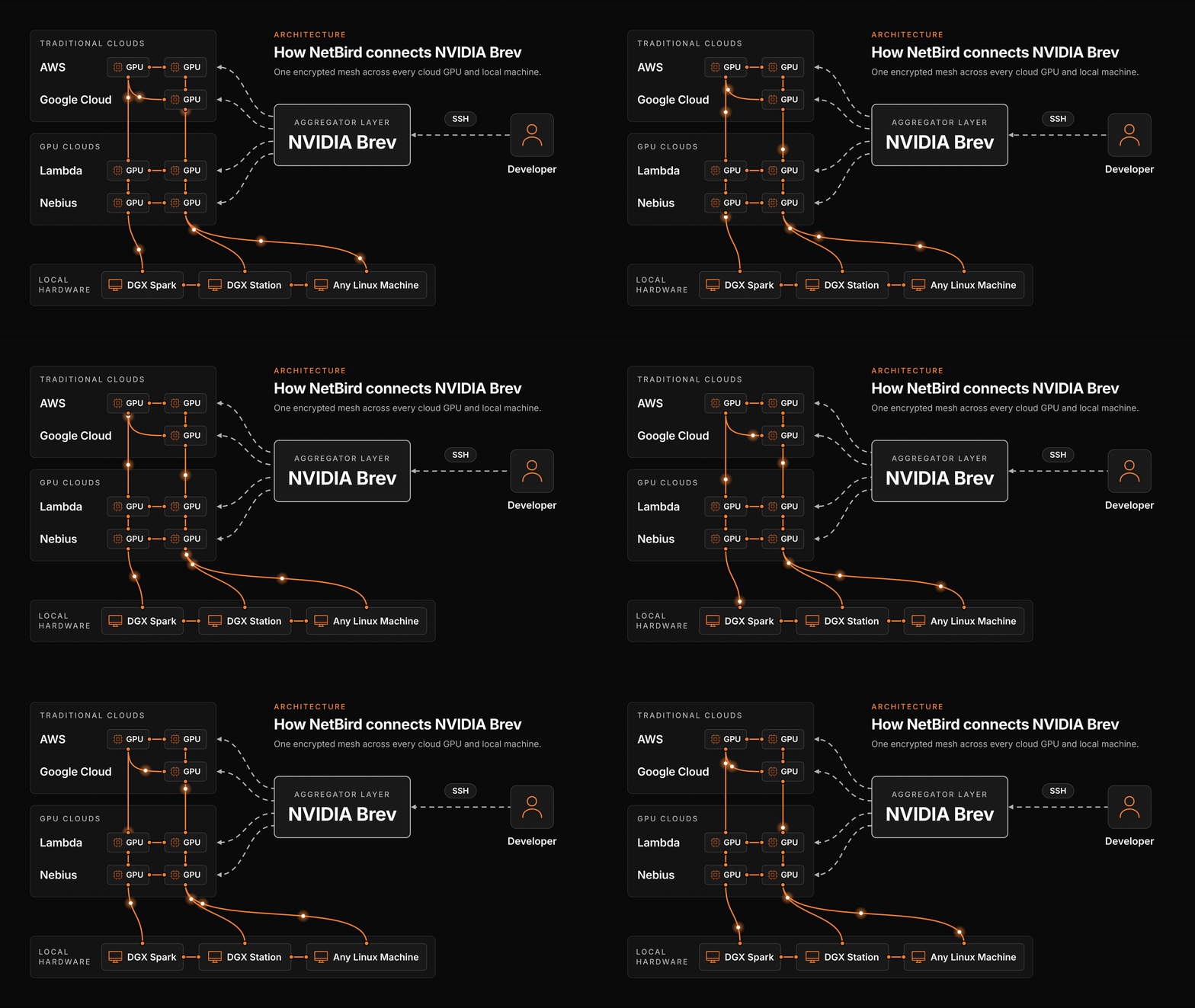
Quick disclaimer on the diagram. This is not Brev's full architecture, it's what I pieced together from their public docs and what I tested myself. NetBird is a fundamental part of their networking layer, and I'll show you the VM side of that at the end.
My setup
Unfortunately I'm not bougie enough to have a DGX Spark sitting in my house, but I do have an old gaming PC with an RTX 3090 and an AMD 3700 running Linux. 24 GB of VRAM is decent power for some lighter weight models. So the plan is to connect that to Brev, access it from a different network here at my desk, put it to work, and then when I want something bigger, spin up a cloud GPU from the same console.
A few things Brev needs on the machine you're registering: Linux with , access, and an SSH server already running. Registration doesn't install GPU drivers or any workload software, and it reads the GPU through NVML, so if doesn't work the hardware profile in the console won't see your card. I had to install a handful of driver packages and reboot before I started, so go ahead and run first and make sure everything shows up.
Do note that if you have a Spark and what you really want is to put it on your own NetBird account with your own groups and policies, that's a different guide. Check out How to Access an NVIDIA DGX Spark from Anywhere with NetBird. Brev Connect enrolls the machine with Brev, and that's what we're doing here.
Registering the PC
Head over to the Brev console at brev.nvidia.com and sign in. You need an Owner or Admin role in the organization. On the compute page there's a button that says Connect a local device (older layouts call it Register Compute). Give your machine a name, I went with , and create a new personal API key. It needs to be a Read & Write key, and it's only shown once, so grab it.
From there it gives you a one-liner to drop into the machine. It exports the API key as an environment variable, installs the Brev CLI, and runs with your name and token. Since the key is right there in the command, treat it like a password.
If you'd rather do it by hand, this is the same flow from their Connect DGX Spark guide, and it works on any Linux box that meets the requirements:
The installer puts in , so that line is just for the terminal you're in.
It'll ask for because NetBird gets installed as a systemd service. You'll see it print "Brev tunnel ready" after step one, collect the hardware profile (there's my 3700 and the 3090), and register the device. And just like that, back in the console under compute, my old gaming PC is sitting there with an option to SSH into it. SSH isn't actually on yet though, and nobody has access. Also, passing the API key to doesn't save it for the next commands, so keep it handy.
Warning: If the machine is already on a NetBird account you still need, don't register it with Brev. The setup runs for Brev, which points your existing client at their management. And later on uninstalls NetBird completely and deletes and .
SSH in from another network
On the GPU machine, enable SSH for a Linux user that already exists. This doesn't install or start , something has to be listening on the port you pick. The default is 22.
Enabling SSH still doesn't let anyone in. Next you grant access to your Brev user for that same Linux account. You can run this on the GPU or from another computer:
It goes into interactive mode and asks for the machine, the SSH port, your Brev user, and the Linux username. Select the old gaming PC, give it the same user, and proceed.
Now over on the machine you're actually sitting at, install the Brev CLI and log in with your Brev user account, not an API key. API key logins don't set up the SSH credentials that needs.
Replace with whichever organization owns the machine. And will you look at that, it resolved the target through an NVIDIA address and we're in an SSH session. gives me , not very descriptive, but shows the 3090 ready to go.
One heads up here. My desktop already runs NetBird for my own mesh, and because Brev is also running NetBird in the back end, tripped over that the first time. I got it sorted, but if the computer you're connecting from needs to stay on your own NetBird account, I'd connect from a different machine.
Putting the 3090 to work
I already had Ollama on this PC, and a good amount of models on it. For a coding task a 14B parameter model is probably good enough, so Qwen 2.5 Coder it is. About 9 gigs:
The prompt was simple: build a complete, playable snake game in a single . In a second Brev shell I had running so I could watch it work, and it is cooking. Memory fills up, wattage goes to basically full capacity, and then it's done. Faster than I expected. Once I saved the output to , you can see the card idle right back down.
Let's serve it. Bind to localhost only:
Now from my local machine, disconnect from the Brev shell and port forward. The Brev dashboard will actually generate this command for you if you give it the ports:
Go to , hit play, arrow keys, and there's a very simple game of snake. It's not perfect, but for a 14B model running on an old gaming PC, pretty good nonetheless.
A couple of notes on on a Brev Connect machine. It does two things: it calls Brev's OpenPort API, which the comment describes as opening the port on the NetBird side, and then it opens an SSH tunnel from your localhost to on the GPU. That's why I bound the server to localhost. The remote binding also sticks around after you Ctrl+C the local forward, so when you're done:
Or remove it from the machine's ports in the console. One per command, and if you pass the flag twice only the last one counts.
When you need more than 24 GB
The 14B model definitely has its limits. When I need something bigger than what's sitting in my house, that's the aggregator side of Brev.
Back on the compute page, create a cloud instance. Because Brev is pulling from a bunch of providers there's a pretty good amount of options compared to going to one provider directly. What I want is a GPU with 40 gigs or more of VRAM, so something like an L40S with 48 GB. The A100s would be better if I were actually training models, but for inference this is going to be good. You can see the actual providers listed, Scaleway was right there, along with the disk and compute breakdown. There are software configuration options, but VM mode comes with everything we need, so I left the defaults, called it , and hit deploy.
Real quick on cost, since this is per-hour billing: when you stop an instance, Brev releases the GPU back to the provider and keeps your data, but if that GPU type is out of capacity when you try to start it again, the restart fails and your data is stuck there until capacity comes back. Their own docs say to push your work to git before you stop.
A few minutes later the VM is built. Same command as before:
And real quick, when I log into this one for the first time, shows NetBird is already there. It's pre-installed on these cloud instances, same as CUDA and Docker.
Ollama doesn't come on this image, so let's install it. The script recognizes the NVIDIA GPU right away, and this time I'm grabbing the 32B version of the same model, which is ideal for a card with this much VRAM:
Paste in the exact same prompt, save the HTML, and serve it on a different port so it doesn't collide with the 3090:
Then from my local machine, new terminal, same port forward command pointed at the cloud instance:
and here's the new snake game. Granted it's the exact same prompt, but I can already tell it's a bit better. The scoring works properly this time. Simple prompt, simple example, but when you need that little extra horsepower it's really easy to spin up a cloud GPU in the same environment you're already using for your local hardware, with the same shell and port forward commands.
On a plain cloud instance is just the SSH tunnel from their connectivity docs. The extra OpenPort step is specific to Brev Connect machines like the 3090.
One more thing
Brev Connect, the part I used to bring my gaming PC in, is really just one piece of this. If you go into the cloud GPU and scroll down to the networking section, that's where you set up connections between your different virtual machines. Edit network mode and you get three options: isolated, which is the default, ingress only, or a mode that meshes your VMs together.
Those connections between VMs in the cloud are powered by NetBird too, which is why the client is already on every instance. So whether it's your own hardware connecting into Brev or VMs across different providers, it's all running over the same mesh network, and you can reach exactly what you need, when you need it.
When to skip Brev Connect
Use Brev Connect when the computer is yours, it's Linux with systemd, and you want it listed next to cloud GPUs you'll launch later.
Skip it if what you want is that machine on your own NetBird account with your own policies. Install NetBird yourself. The DGX Spark guide is that pattern and it works for any Linux GPU box.
Skip it if the machine is already on a NetBird account you need to keep, for the reasons in the warning above.
And a cloud GPU on its own doesn't need Connect at all. Create the instance, in.
Wrapping up
Honestly, it's just really cool seeing what companies end up building with your product. There are a lot of options out there for remote connectivity, and finding NetBird in Brev's registration code and on every one of their cloud instances is an honor. It says a lot about the work our engineering team is putting in.
If you want to go deeper on Brev, their docs are linked below. And one more time, if you're experimenting with this on a machine that already has a NetBird mesh running, you might hit a conflict, because both things are NetBird in the back end.
With all that, I do hope you found this useful. Have a beautiful day.
Sources
- Brev Connect
- Brev Connect CLI
- Connect a DGX Spark, same clicks for other supported Linux machines
- Managing Brev Connect
- GPU instances
- in brev-cli