
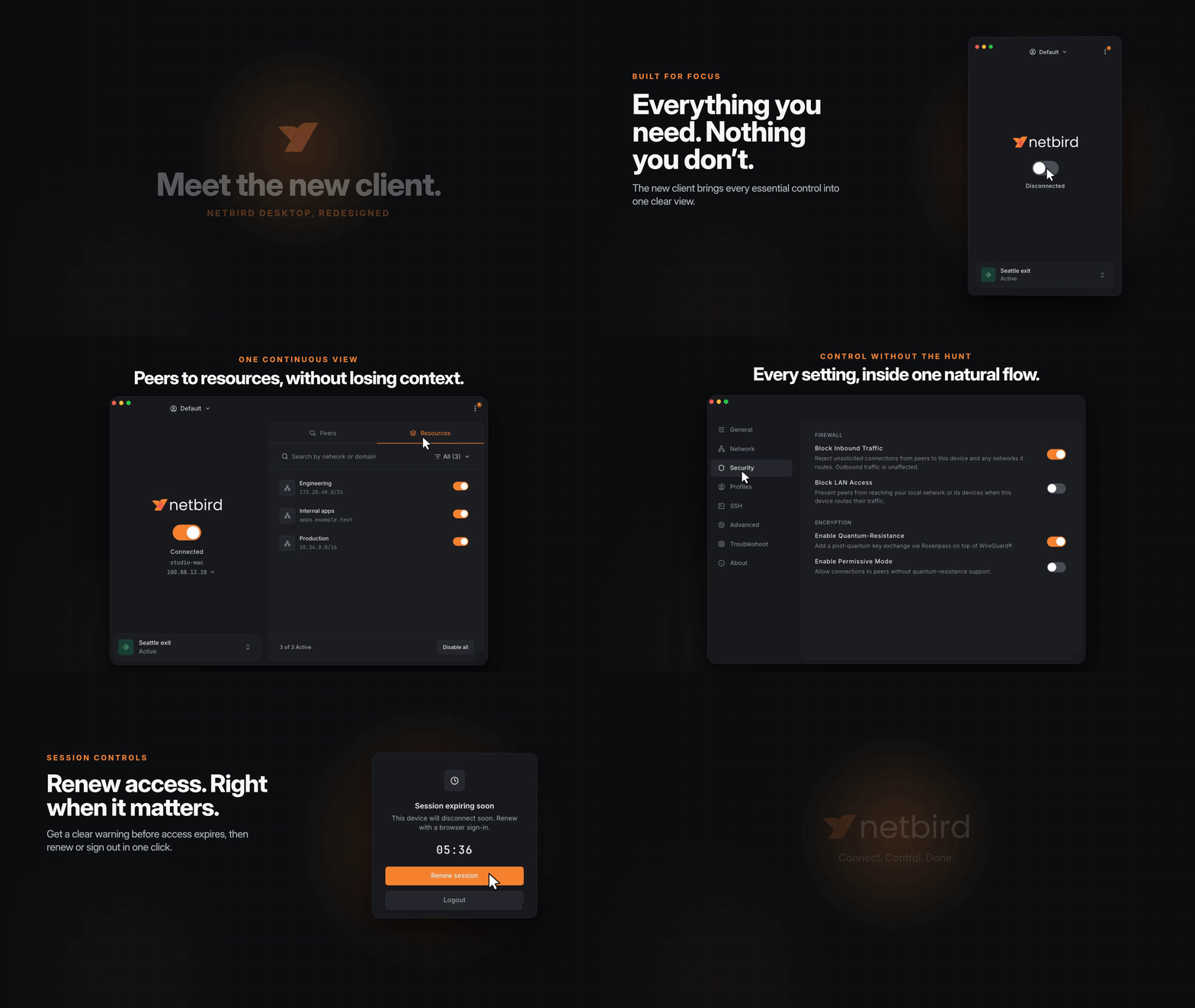
When we shared the first v0.75 release candidate back in June, the new NetBird desktop app had just made the jump from internal rebuild to something everyone could try. Six release candidates and a lot of community feedback later, it's ready for the stable channel.
This is a lot more than a fresh coat of paint. The old Fyne interface is gone, replaced by an app built on Wails 3, React, Vite, and Tailwind CSS. The proven NetBird agent and WireGuard engine underneath haven't changed, but pretty much everything you see and click has: the main window, profiles, settings, peer details, notifications, session renewal, translations, and the tray experience across Windows, macOS, and Linux.
The RC cycle also gave us time to harden the parts you don't see. Profile and resource handling, managed-device settings, Windows startup behavior, SSO handoff, RDP connections, and tray state changes all picked up fixes on the way to stable. And v0.75 goes beyond the desktop: self-hosted admins get a unified Admin CLI, and the client and management server gain new sync, security, and integration capabilities.
What's New at a Glance
- Default and Advanced views: a compact connection window, or an expanded browser for peers and resources.
- First-class profiles you can rename, edit, and switch without leaving the app.
- Peer details with addresses, routes, connection state, and group membership one click away.
- A reactive UI that follows agent and CLI changes immediately, no refresh or relaunch needed.
- Session renewal without disconnection, so reauthenticating doesn't drop your tunnels.
- MDM-aware controls that hide or lock whatever your administrators manage centrally.
- A self-hosted Admin CLI for local users, MFA, proxy tokens, and reverse proxy maintenance.
- Localization with ten languages at launch and an interface built for more.
- Better diagnostics that collect daemon and desktop logs in one debug bundle.
- Cross-platform polish for tray behavior, launch on login, X11 support, and RDP sessions.
One App, Two Views
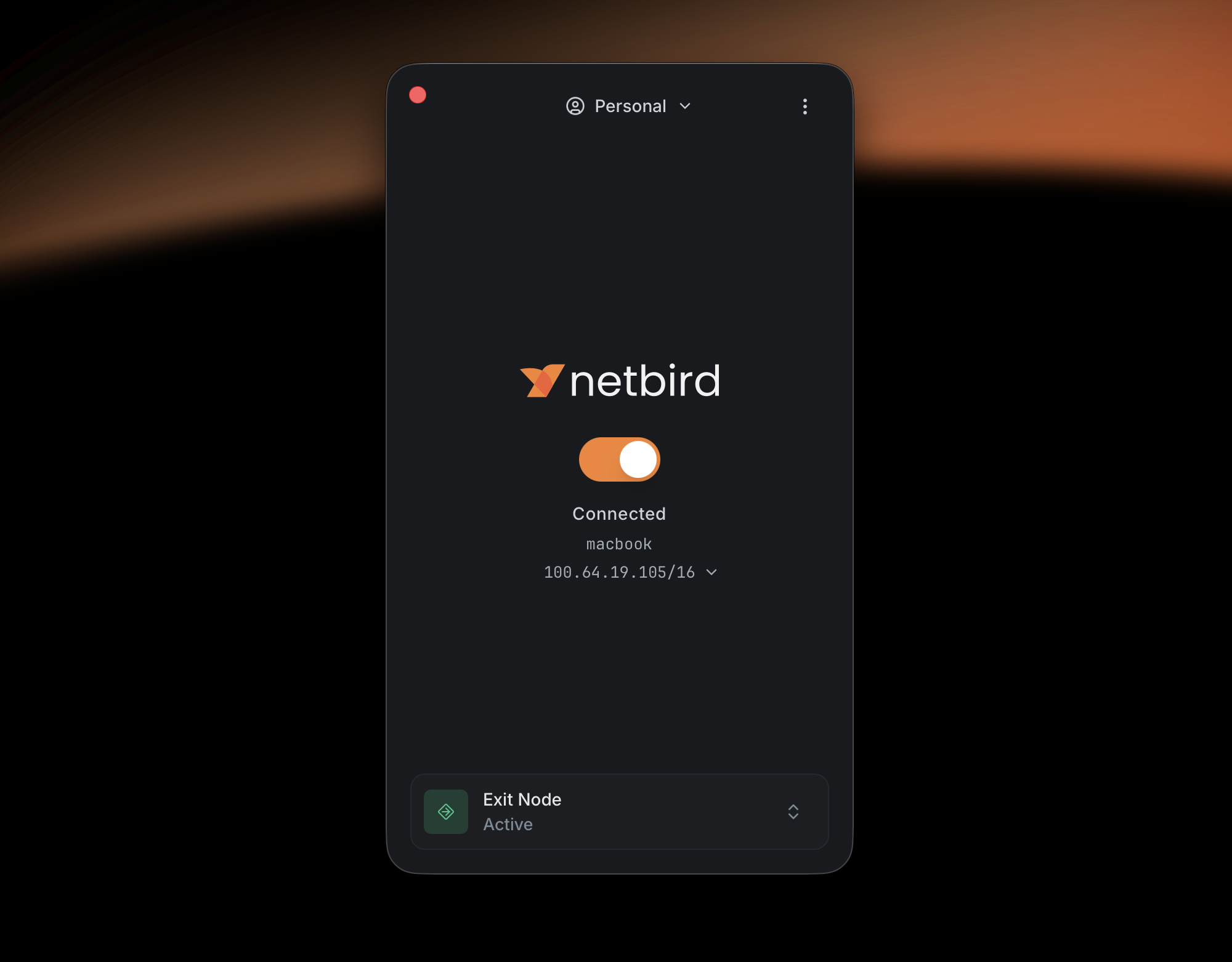
New installs get a short first-run welcome flow, and from there the main window starts in Default view, a compact layout that keeps the essentials front and center: active profile, connection status, hostname, NetBird IP, and your selected exit node.
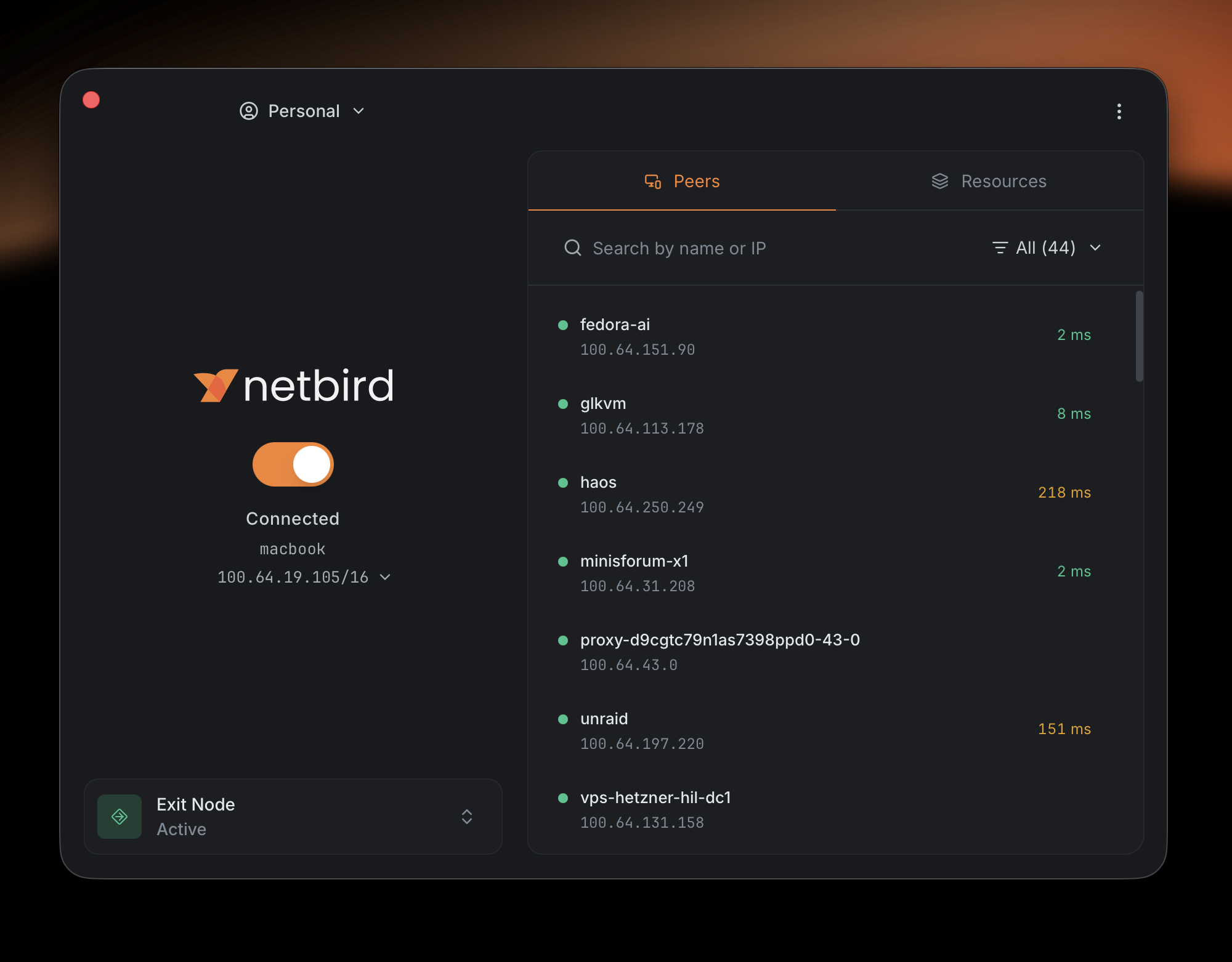
Switch to Advanced view and the window expands into a live view of your network. Connection controls stay on the left, while dedicated Peers and Resources tabs show you what's online and what this device can reach.
Peers at a Glance
The Peers tab is a searchable inventory of the other devices in your NetBird network. Each row shows the peer name, NetBird IP, availability, and current connection latency, so you can tell a healthy direct connection from a slow or unreachable device at a glance. Search by name or IP, or filter the list down when you only care about a subset of the network.
Select a peer and a details panel opens with the stuff you'd otherwise need the CLI for: status, NetBird address, route and connection details, and group membership. Pretty handy when you're trying to figure out why two peers aren't talking. The app is now a genuine troubleshooting tool instead of just a connect button.
Resources You Can Reach
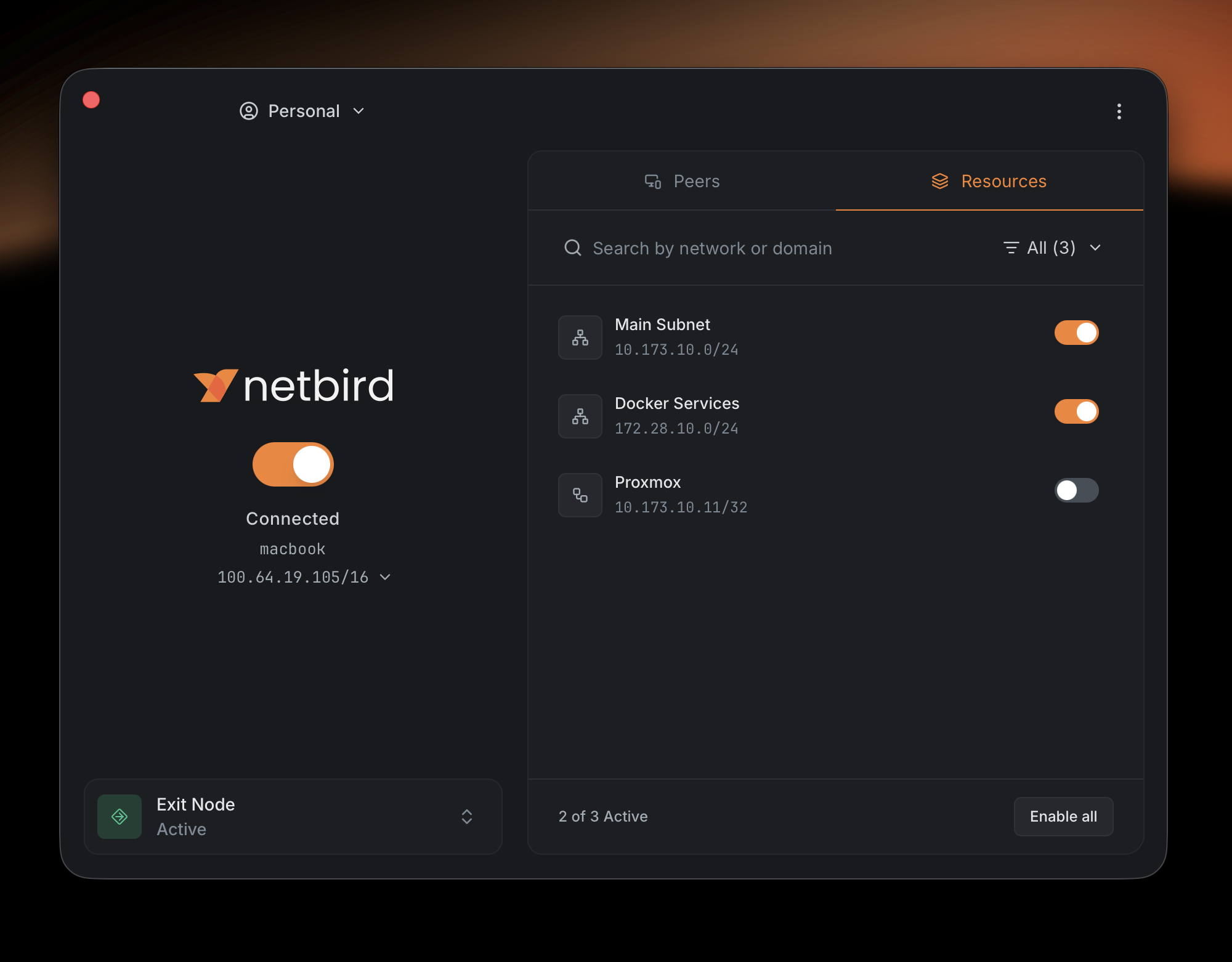
The Resources tab brings the private networks and services available to this device into the same window. Search by network or domain, enable or disable resources individually, or flip the entire set at once. The active count at the bottom tells you how many of your assigned resources are currently enabled, no dropping to the command line to check routes.
Profiles Feel Native Now
Profiles let one device connect to separate NetBird accounts, think Work, Home, or a lab environment. They existed in the previous app, but managing them never felt like a complete workflow.
v0.75 gives profiles their own tab in Settings. You can add, edit, rename, delete, and switch profiles in one place. Names support uppercase letters and spaces, and profile-type icons make the active account easy to spot in the switcher.
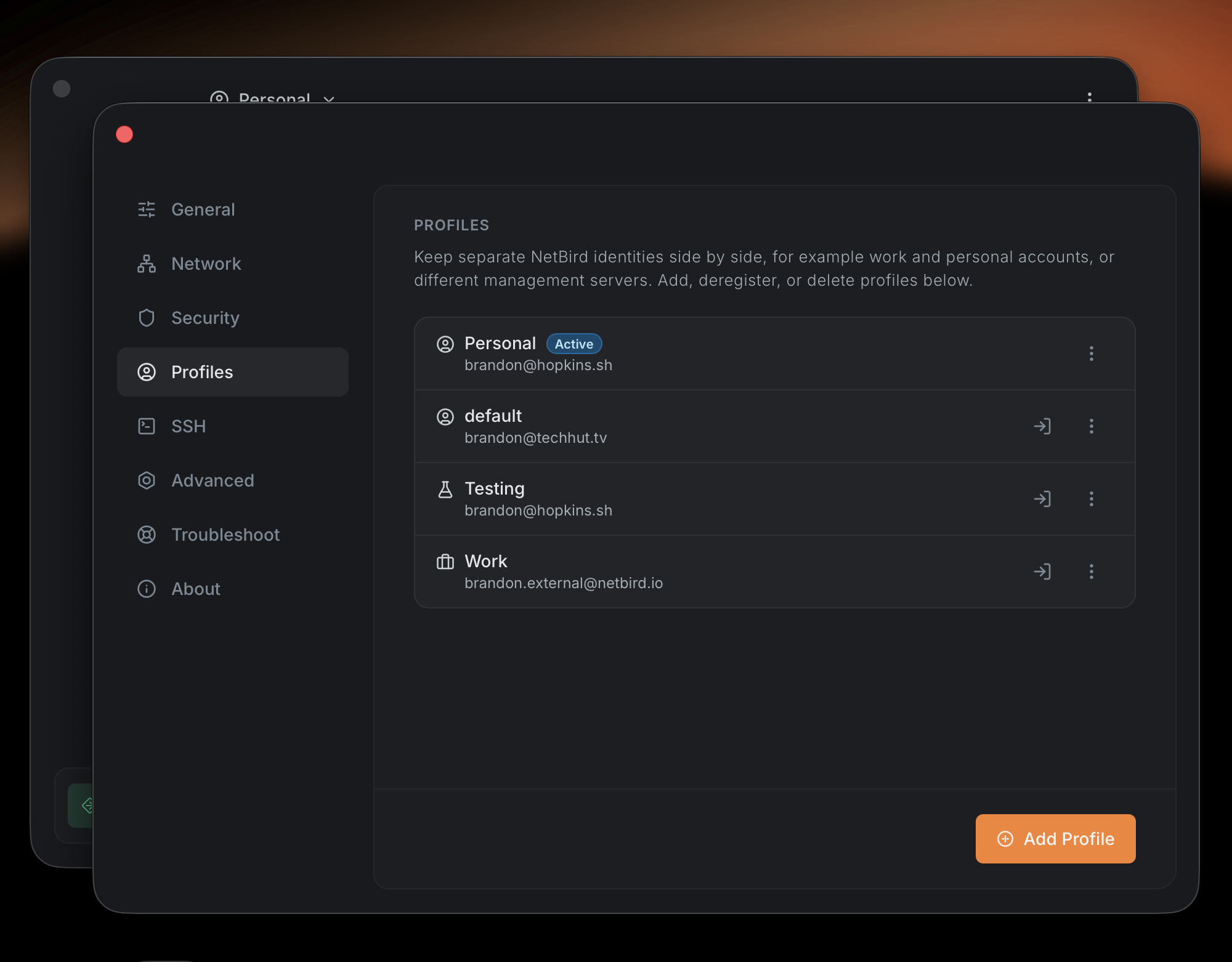
Everything stays in sync, too. Connect, disconnect, or change profiles through the NetBird CLI and the open app follows along automatically. Selecting a profile from the header or tray switches to it and brings the connection up, while switching from the Profiles settings page leaves it disconnected on purpose, so you can point it at a different management server first. The same goes for connection changes in the background: no manual refresh, no stale UI waiting for a relaunch.
Settings Organized Around the Job
The old settings screen grew one option at a time. The new one uses focused tabs, so everyday preferences don't sit next to low-level interface and routing controls:
- General covers launch on login, notifications, and display language.
- Network holds reconnect behavior plus client-route, server-route, DNS, and IPv6 toggles.
- Security groups inbound traffic, LAN access, and Rosenpass settings.
- Profiles manages every NetBird account configured on the device.
- SSH contains NetBird SSH and SSH server options.
- Advanced exposes the interface name, WireGuard port, MTU, and pre-shared key.
- Troubleshoot creates a debug bundle with agent and UI logs at the configured log level.
- About shows version details, useful links, and update controls.
One new default worth flagging: fresh GUI installations now enable Launch NetBird UI at Login on supported platforms. If you're upgrading, your existing choice sticks, changing the toggle later is respected, and administrators can disable the behavior entirely through managed policy.
Localization Built In
The previous desktop app had no practical way to ship translations. This one was built for localization from the start, and v0.75 includes English, German, Spanish, French, Italian, Portuguese, Hungarian, Russian, Japanese, and Simplified Chinese.
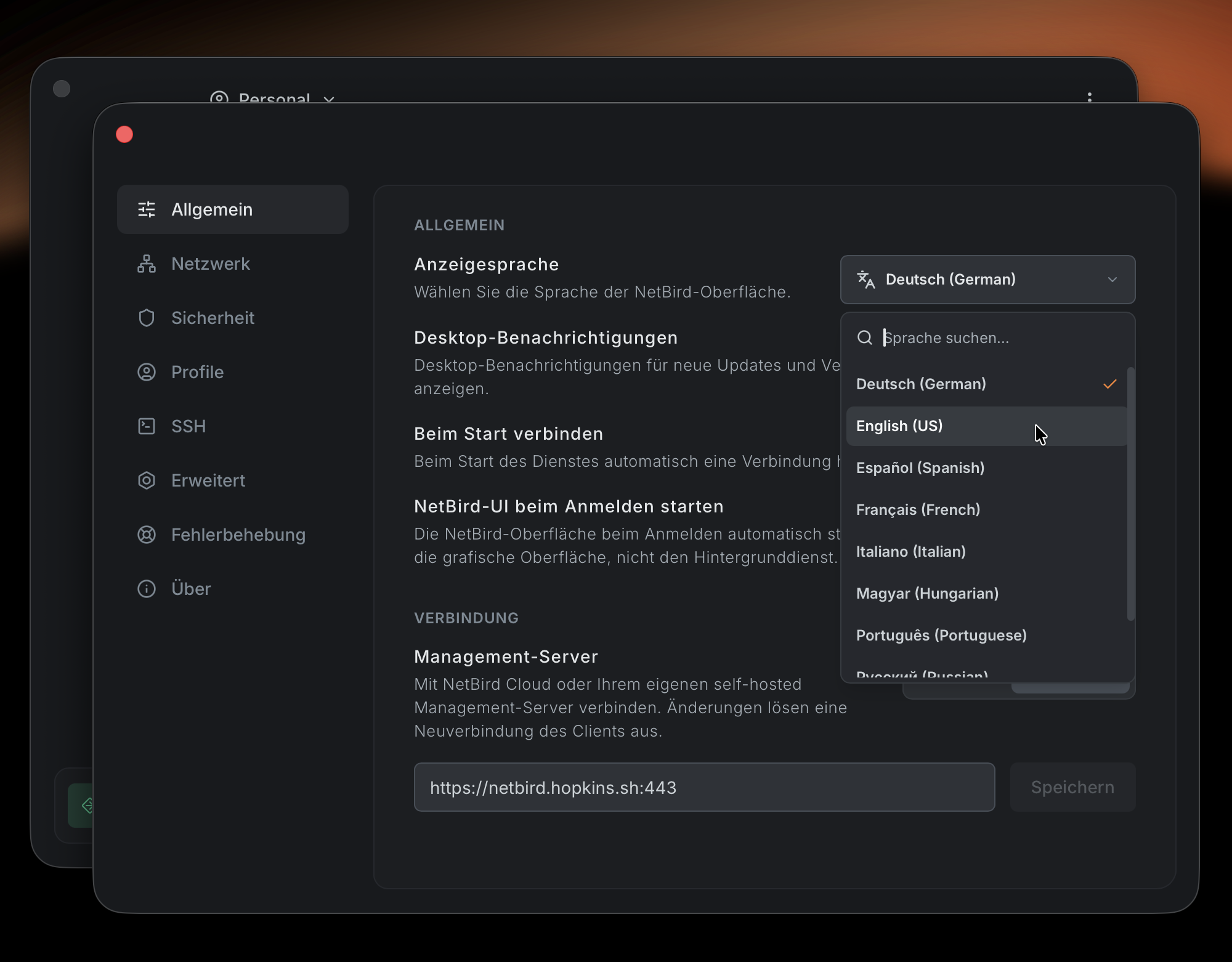
Pick a language under Settings → General → Display Language and the interface updates immediately, tray menu included. Do note that this is the beginning of the translation work, not the end. If a phrase reads awkwardly in your language, or your language is missing entirely, contributions from native speakers are exactly what we need.
And if you'd rather watch than read, here's a full tour of the new app:
NetBird MDM: Configure Once, Enforce Across the Fleet
The new client is built to be deployed and managed through whatever MDM platform your organization already uses. v0.75 ships policy templates for both major desktop platforms:

- Windows: ready-to-import ADMX and ADML templates for Group Policy or Intune ADMX ingestion. The same policies can be delivered through an Intune Registry CSP profile or during MSI deployment, and they're stored under .
- macOS: a ready-to-adapt profile you can upload as a custom profile in Jamf, Kandji, Mosyle, Microsoft Intune, or Workspace ONE. macOS writes the enforced settings to the system-managed preferences for the NetBird client.
Configure the policy once, assign it to your devices, and NetBird applies it as the highest-priority configuration layer. IT teams can:
- Enforce the management server and, where required, a pre-shared key.
- Control auto-connect, client and server routes, inbound traffic, NetBird SSH, Rosenpass, and the WireGuard port.
- Lock client configuration entirely with .
- Hide profile management with and remove the Resources tab with .
- Keep the desktop app in its compact view with .
- Expose or hide capabilities like the SSH server with .
- Turn off launch on login with , which also removes an existing login item the next time the GUI starts.
The app builds its interface around the policy in effect. Disable profile management and the Profiles tab disappears. Restrict resources and the Resources tab is gone. Lock settings updates and the Network, Security, and Advanced pages are hidden. People see the controls they're actually allowed to use, not a wall of options that will never take effect.
Enforcement doesn't stop at the interface, either. If a UI or CLI request tries to change an MDM-managed value, the daemon rejects it instead of letting a local setting override IT policy. Policy changes are picked up while the client is running: NetBird reapplies the effective configuration, refreshes the open app, and notifies the user that their IT policy was applied.
The RC cycle surfaced the edge cases that only show up on real managed fleets. The stable app normalizes management URLs with implicit and explicit default ports, so values like and no longer register as a conflict. And on Windows, the Quick Actions prompt now respects , so a managed device configured not to connect at startup doesn't ask the user to do exactly that.
Renew Your Session Without Dropping the Connection
Session expiry used to be unnecessarily disruptive. Reauthentication could tear down the whole NetBird connection, taking an active SSH session, remote desktop, transfer, or backup with it, when the only thing that actually needed replacing was your sign-in.
The new app warns you before expiry with an OS notification and a focused dialog. Choose Renew session, complete the browser sign-in, and your existing connection stays online while NetBird swaps the session behind it.
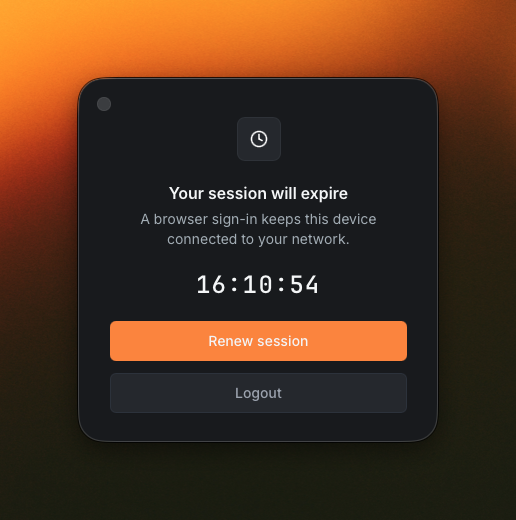
We also moved the final SSO-to-connect handoff out of the webview and into the Go side of the app, so a hidden or suspended tray window can't delay the connection after browser authentication completes. The UI catches up when it wakes, but the tunnel doesn't wait for it.
The stable release keeps the session deadline visible through transient reconnects and shows an explicit expired state in the tray instead of making the row disappear. Clicking it takes you straight back to sign-in, and the renewal flow now cleans up its browser and expiration dialogs when it finishes.
A Clearer System Tray
The tray status indicator gives you the connection state without opening anything: green when connected, yellow when you need to log in, grey when disconnected.
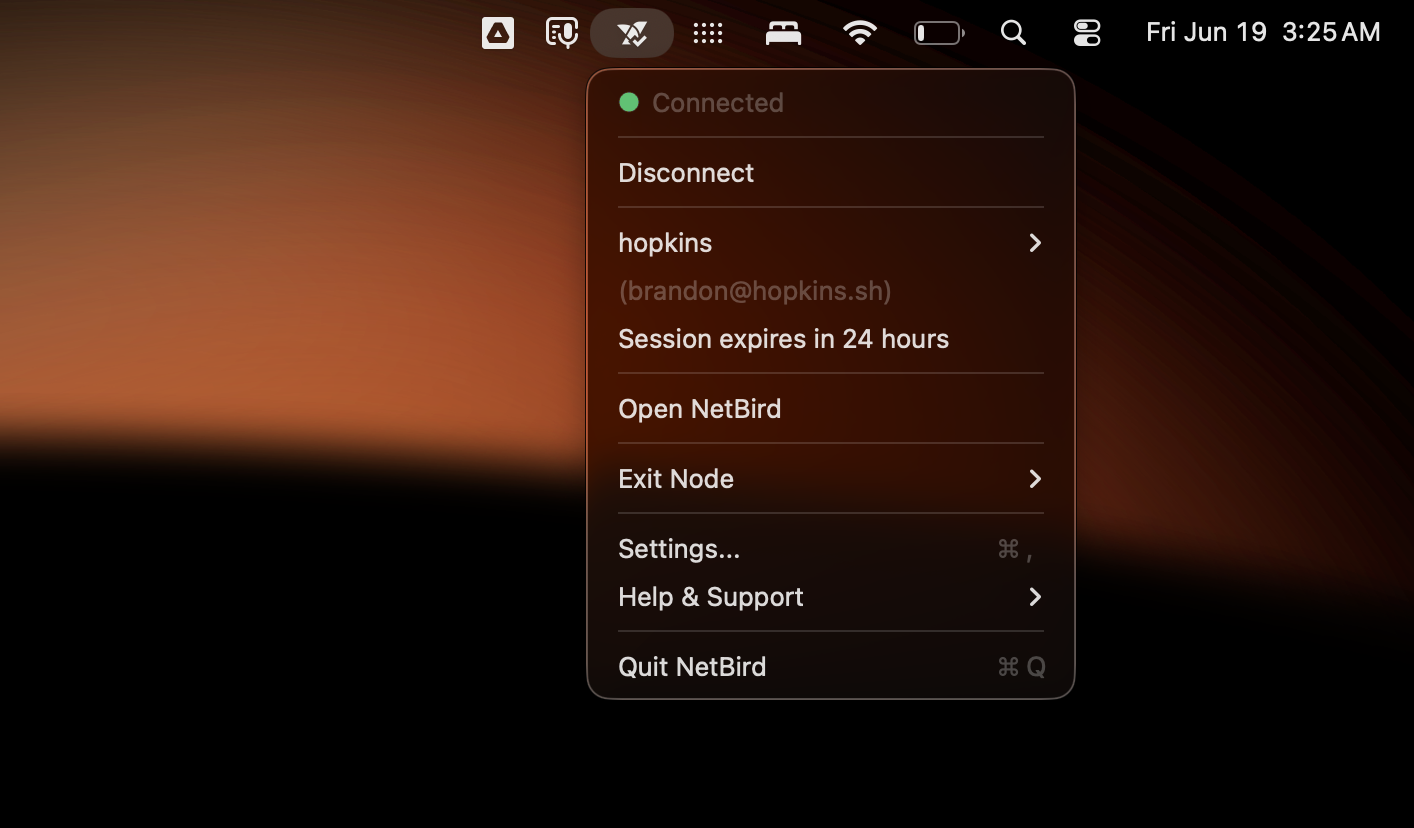
There's a lot of platform-specific work behind the small details here. The icons are theme-aware on every platform, and Windows in particular now renders every tray state correctly on dark themes and treats the app's per-user setting as the source of truth for launch-on-login behavior. On macOS, the Dock icon only appears while an app window is open. Linux gets improved X11 window-manager support, and the client behaves properly when opened through a remote desktop session. Choosing Quit from the tray also disconnects the daemon before the app exits, so the menu action does what it says without a long teardown.
Six Release Candidates of Hardening
RC1 introduced the redesign. The five candidates after it were deliberately boring, in the best way: they turned day-to-day feedback into the stable app.
- Profiles and resources: fixed regressions in and , corrected the Resources selector, and protected the default profile from deletion.
- Managed settings: made auto-connect prompts honor policy and fixed management URL comparisons on MDM-enrolled devices.
- Windows behavior: corrected dark-theme tray icons and removed competing machine-wide startup entries so the app's setting works consistently.
- Authentication: added timing instrumentation around the SSO flow, then moved the post-login connection handoff into Go so a suspended webview can't stall it.
- Framework and platform fixes: updated Wails throughout the cycle, improved browser-relay WebSocket shutdown, and gave browser-based RDP connections more time to establish.
- Startup defaults: enabled launch on login only for genuinely fresh installations while preserving the preference of every upgrading user.
If you want the complete play-by-play, the GitHub notes for RC1, RC2, RC3, RC4, RC5, and RC6 have it all.
A New Admin CLI for Self-Hosted Operations
The biggest addition after RC6 is a unified Admin CLI for self-hosted NetBird servers. Do note that this is a server-maintenance interface, not an command in the endpoint client. It runs directly against the Management data store, and for local user operations, the embedded identity provider.
The command ships in both the combined binary used by new installations and the separate binary found in older multi-container deployments.
| Command | What it does |
|---|---|
| Changes an embedded IdP user's password by email or user ID and clears the active local session, so the new password is required at the next login. works as an alias. | |
| Clears a local user's TOTP and WebAuthn enrollment plus the active session, prompting the user to enroll again at the next login. | |
| , , | Checks or changes local MFA for users who authenticate through the embedded IdP. |
| , , | Manages reverse proxy access tokens, including optional expiration. The plaintext token is displayed only once, when it's created. |
| Repairs stale reverse proxy state after an unclean Management shutdown. Use to preview the change or for non-interactive maintenance. |
For a combined-container deployment, the command prefix looks like this:
Older multi-container deployments use with their path. The previous top-level commands stick around as deprecated compatibility aliases, so existing proxy automation doesn't break overnight.
The local user and MFA commands require NetBird's embedded IdP. They don't manage accounts in Google Workspace, Microsoft Entra ID, Okta, Keycloak, or any other external provider, and local MFA administration expects a single-account embedded IdP deployment.
Before running anything state-changing, back up your NetBird configuration and data stores, use the same CLI version as the running server, and start the upgraded server once so database migrations and embedded IdP clients are initialized. The self-hosted Admin CLI documentation has complete examples and troubleshooting guidance.
Also in v0.75
The desktop app and Admin CLI are the headliners, but several lower-level changes matter if you run NetBird at scale.
Component-based network map sync. Capable clients can now receive the network map as components and assemble their effective configuration locally, instead of Management generating the complete client-specific result for every peer. The new flow is capability-gated, so older clients stay on the existing format while upgraded fleets get a more scalable sync path.
Optional HTTP/JSON daemon gateway. Local tools can talk to the existing NetBird daemon API through generated HTTP/JSON handlers. It's off by default and has to be explicitly enabled with . The gateway supports Unix and TCP sockets, and the existing gRPC listener is unchanged. The daemon API itself also grew status and event stream subscriptions plus networks and exit-node endpoints, which is what the new desktop app's reactive UI is built on, with probe throttling so a chatty UI can't overwhelm the daemon.
More reliable traffic-event delivery. The client can aggregate traffic events into time windows with start, end, and drop counters. Unacknowledged events are tracked and retried until Management accepts them, which cuts event volume without quietly losing visibility during a temporary delivery failure. Management can also filter traffic events by source and destination ID.
DNS-aware lazy connections. When a private resource or custom NetBird DNS zone resolves to an idle peer, the resolver can start warming that lazy connection before it returns the answer. The first application request no longer has to race the WireGuard handshake, while public DNS and already-connected peers keep their existing behavior.
Reliability fixes. A WGWatcher that could silently fail to restart on a fast disconnect and reconnect, stale UDP checksums in the eBPF XDP proxy after port rewrites, a DNS probe listener panic, and a nil-context panic in the iOS dynamic route resolver are all fixed. The relay's early-message buffer also grew to 10,000 entries so relayed handshakes don't get dropped under load.
Security hardening. Relay deployments only trust forwarded client-address headers like from explicitly configured trusted proxies, and the embedded identity provider can restrict its allowed OAuth grant types, including disabling device-code authentication.
Agent Network provider improvements. Agent Network adds Kimi (Moonshot AI) to the provider catalog, along with stronger Amazon Bedrock model matching, Bedrock cost-allocation metadata for user and group attribution, and a per-provider option to disable identity metadata injection when an upstream shouldn't receive it. Management also gains and account settings for accounts that use NetBird primarily as an AI gateway.
Before You Upgrade
The desktop interface and the agent talk over a new API and need to be upgraded together. The normal NetBird packages include both, so most people won't have to think about it, but do note that mixing the v0.75 UI with an older agent isn't supported. If versions end up out of sync, the app shows an update notification.
On Linux, the new app renders in a GTK 4 WebKit webview, so go ahead and install the GUI runtime dependencies before opening it. On Debian or Ubuntu:
Other distributions need the equivalent GTK 4, WebKitGTK 6.0, and packages. The Linux installation guide has distribution-specific details.
Get NetBird v0.75
The new app is the default desktop experience in v0.75, so updating your existing installation is all it takes. Give it a spin and let us know what you think. A lot of what changed between RC1 and stable came directly from people trying it and telling us what felt off.
- Download v0.75: NetBird v0.75.0 on GitHub
- Desktop app documentation: Desktop App
- Profiles documentation: NetBird Profiles
- Full changelog: v0.74.7...v0.75.0
- Try NetBird: Get started at netbird.io/pricing
- Join the community: Star us on GitHub · Follow us on X