
Note: Agent Network is out now, open source and self-hosted only for the moment. It hasn't landed in NetBird Cloud yet, so for now you'll run it on your own deployment.
If you've ever handed an API key to your whole team just so everyone could use OpenAI or Anthropic, you already know how messy that gets. That one key gets copied into a dozen agents, scripts, and files. Someone leaves the company, and that key is just out there. Nobody's quite sure who's spending what, and there's no real way to say "engineering can use Anthropic, but marketing can't." It's the same mess we've all lived through with SSH keys for years: shared, copied onto machines by hand, and never revoked when people move on.
A lot of teams have already tried to fix this, usually by moving to an AI gateway like LiteLLM. And that makes sense: a gateway gets you cost monitoring, rate limits, and model fallback all in one place. But look at what actually happens: you still end up minting a whole pile of keys, one per person, per team, per tool, and the gateway itself sits off on its own, completely disconnected from the rest of your IT stack. The teams who really care end up writing their own scripts to wire that gateway back into their identity provider, basically hand-building a little management plane just to keep track of who holds which key. So the problem didn't really go away. It just moved.
So we built something to fix exactly that. It's called NetBird Agent Network, and it lets any person or agent use any AI provider without ever holding a key. Access is tied to your identity provider instead of a credential, every request is logged, and you can cap tokens and spend per person or per team. Under the hood, it's basically our existing reverse proxy doing the work. It's open source, you can self-host it, and it's available now.
It's the Reverse Proxy You Already Know
We didn't build a giant new AI platform. Agent Network is built right on top of the reverse proxy and private services we shipped over the last few releases. The way Misha tells it, he and our co-founder and CTO were kicking the problem around late one night after a customer call when it clicked: the proxy we already had was, with a few tweaks, already most of an AI gateway. So this is an addition to the platform, not a change to it.
That matters for a couple of reasons. The transport underneath is still NetBird's WireGuard overlay, so the rule is the same one you already know: have a tunnel, get access. No tunnel, no access. And because it's the same proxy and the same identity model, there's nothing new to learn if you're already running NetBird.
Two Things It Solves
Agent Network covers two use cases that tend to show up together once AI starts spreading through a company. The Control Center ties them into a single view: pick a group, say your developers, and you can see everything they're cleared to reach in one place, the LLM providers sitting right next to the databases, CRMs, and internal APIs.
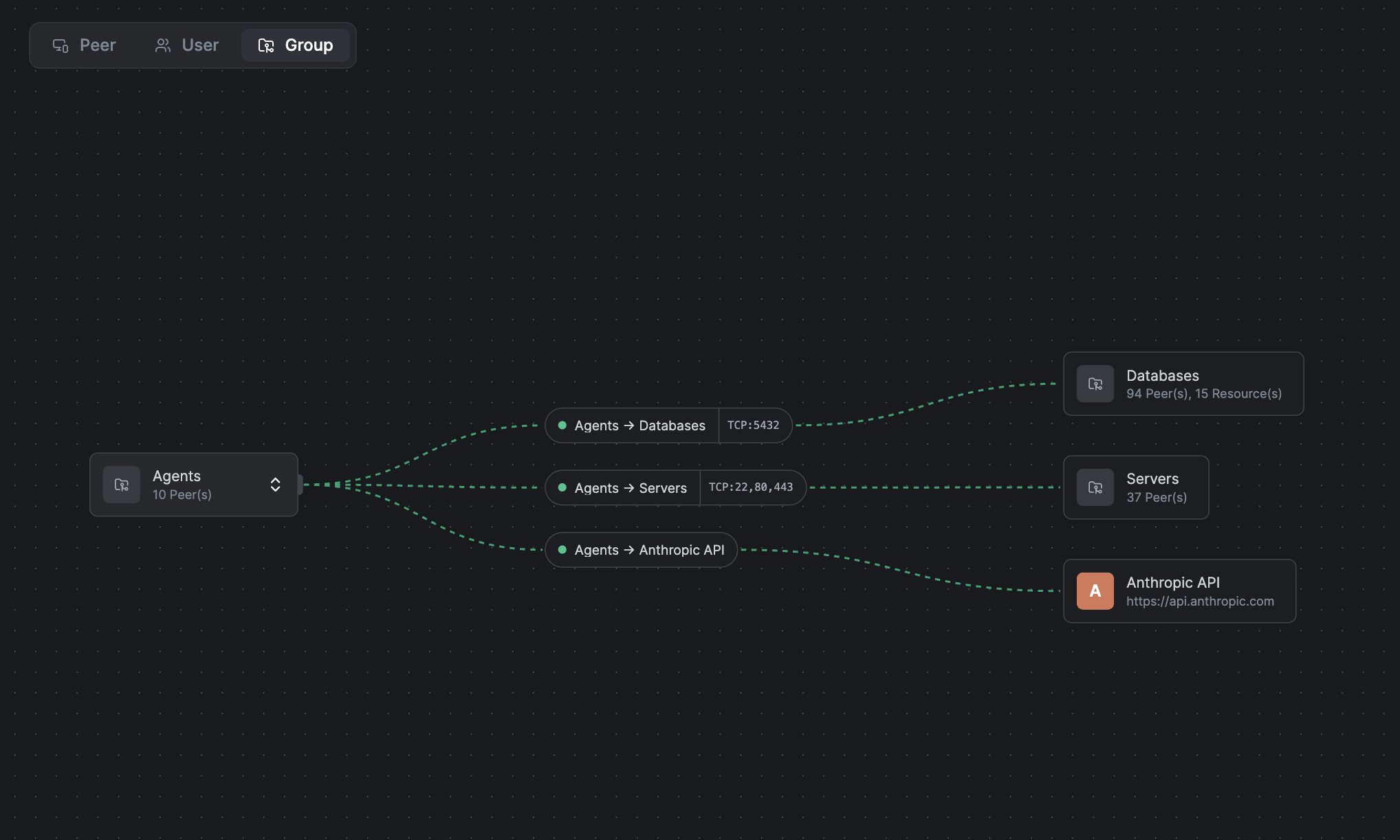
1. Keyless Access to LLM APIs
Your agents reach OpenAI, Anthropic, and AI gateways through a single endpoint that's only reachable over the encrypted tunnel. There are no keys to store or share on the client. NetBird holds the provider key server-side, injects it on the fly per request, and ties every call to a real identity from your IdP, Okta, Microsoft Entra ID, Google, and others. From there you get per-identity policies, token and budget limits, model guardrails, and full audit logs on all your outbound AI traffic.
2. Agentic Access to Internal Resources and Local Models
The same model also controls what agents can reach inside your network. Databases, internal APIs, private services, and self-hosted models served by Ollama, vLLM, or a GPU cluster, all over the same tunnel. Each agent connects with its own identity, and policies define exactly what it can touch. Nothing gets exposed to the public internet, and because NetBird is peer-to-peer, a resource can even reach back to an agent when it needs to, like for a callback or webhook.
Agents are essentially independent machines, and wiring them directly into your databases and CRMs carries real risk. Treating them like any other peer on the network, with their own identity and their own access policy, is a safer and more controllable approach. And because it's all the same model underneath, you can mix freely: a human in the loop, an agent in the loop, or a fully autonomous agent, each one governed by the same policies.
How It Actually Works
The model is straightforward. There are two paths, and which one a request takes depends on what it's calling.
LLM traffic goes through the proxy. You point your agent at the NetBird endpoint instead of the provider's URL. The proxy establishes the caller's identity from the tunnel, checks it against your policies, enforces your token and budget limits and model guardrails, injects the upstream provider key, forwards the request, and records the usage and cost. On the way out it strips any client-supplied auth headers, so even if someone hardcoded a key, it never reaches the provider.
Internal resources skip the proxy entirely. The agent connects straight to the target over a peer-to-peer WireGuard tunnel, exactly the way any two NetBird peers talk. Same identities, same access policies, just no proxy in the middle, which keeps that traffic fast and private.
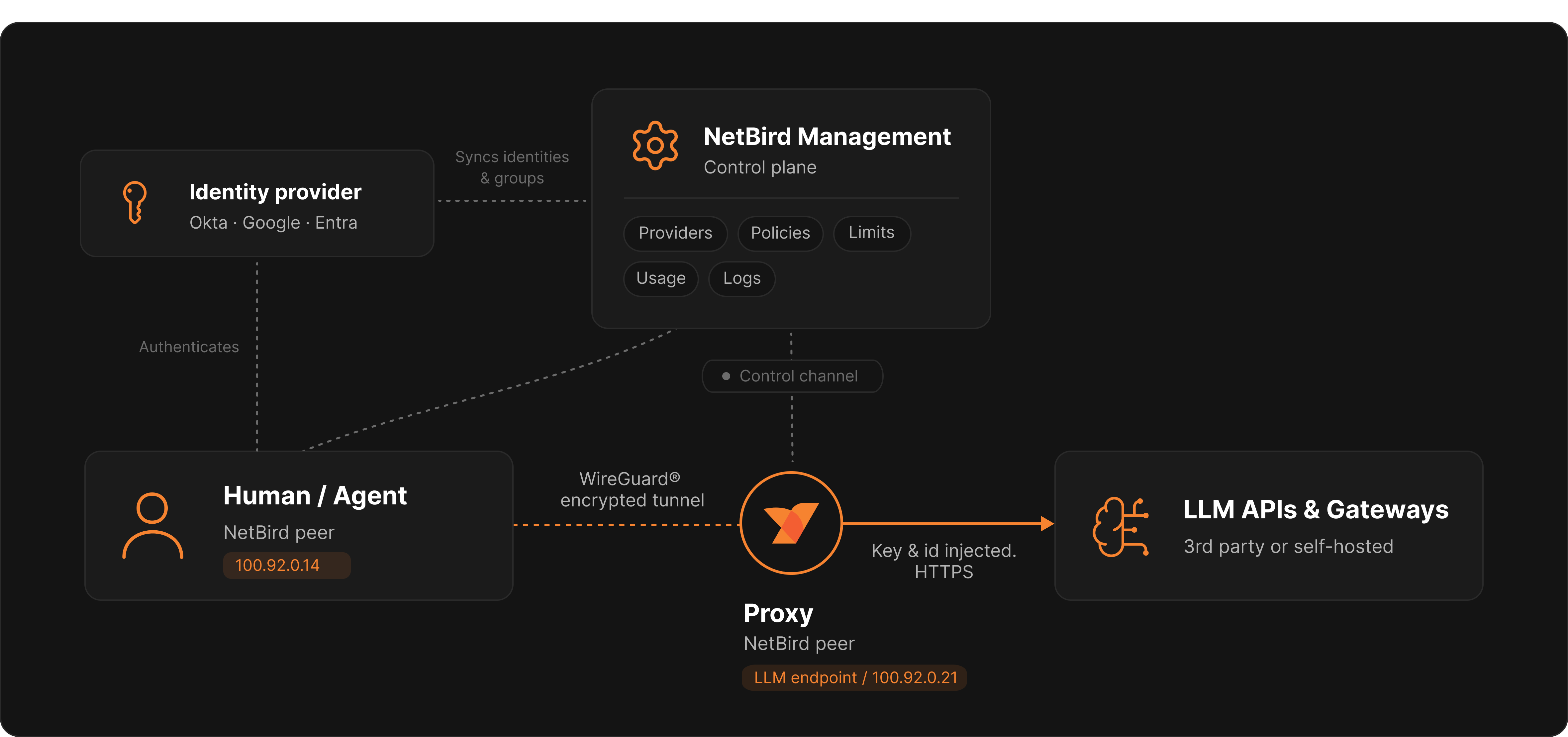
The whole thing is default deny. Nothing reaches a provider until a policy explicitly allows it.
Connect a Provider
A provider is just an upstream AI service you want to route to. Go to Agent Network → Providers, click Connect Provider, pick your provider, and paste the API key. NetBird stores it encrypted server-side, and the key never touches the client.
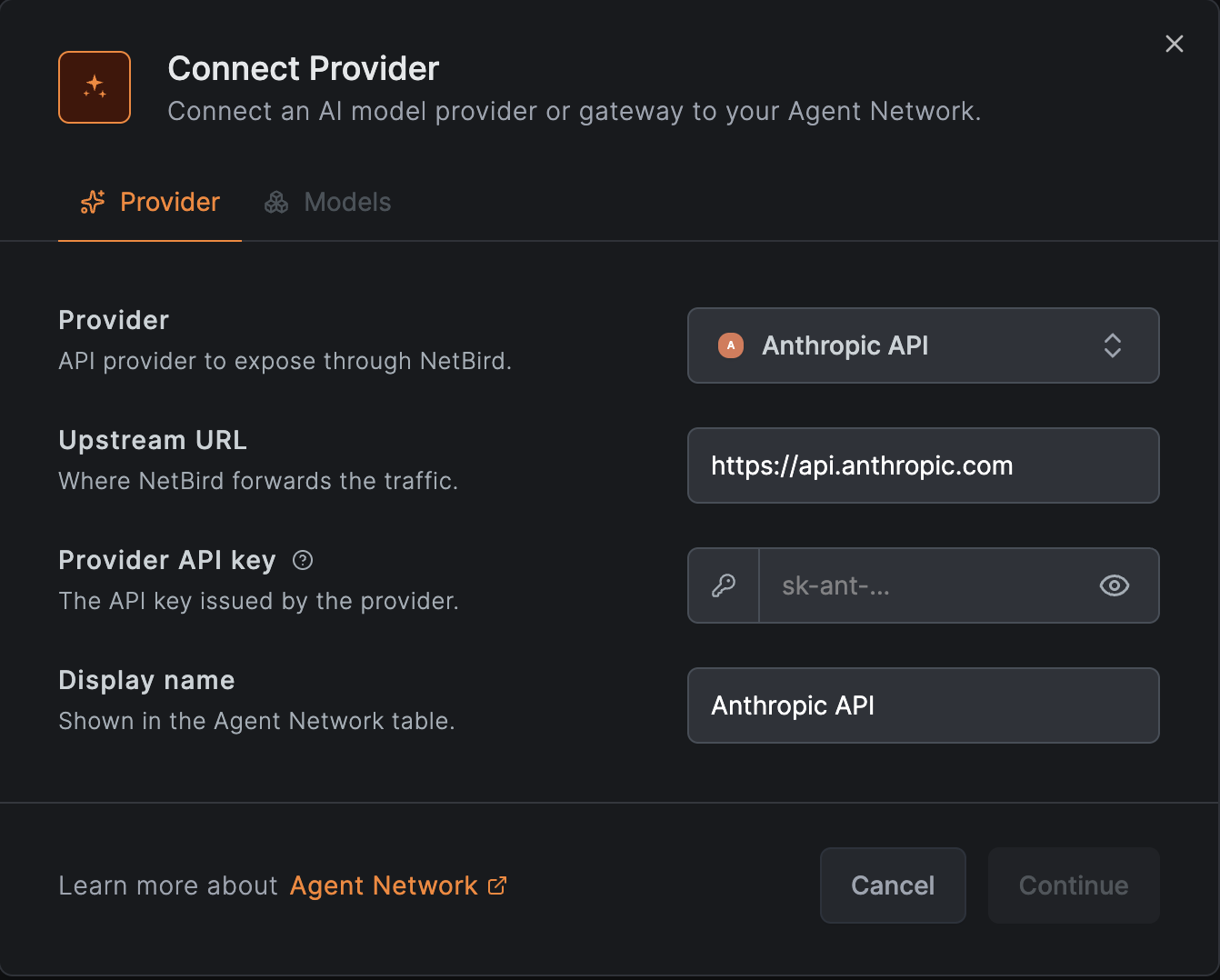
The catalog is broken into three groups:
- AI Providers (the first-party vendor APIs): OpenAI, Anthropic, Azure OpenAI, AWS Bedrock, Google Vertex AI, and Mistral.
- AI Gateways (routing layers that sit in front of multiple providers): LiteLLM Proxy, Portkey, Bifrost, Cloudflare AI Gateway, Vercel AI Gateway, and OpenRouter.
- Custom / Self-hosted: any OpenAI-compatible endpoint, including local models served by Ollama, vLLM, or your own GPU host.
If you already run a gateway like LiteLLM, NetBird can forward the calling agent's identity along to it, writing the agent's IdP groups into and its identity into the header, so your gateway can do its own attribution and budgets on top. Bring your own gateway, in other words, and let NetBird own the access layer in front of it.
When you connect your first provider, NetBird generates your endpoint, a tunnel-only base URL under . That's the address your agents point at.
Configure Your Agent
Next to your endpoint, click Agent Config, and the dashboard gives you copy-paste tabs for Claude Code, Codex, the OpenAI SDK, and cURL, with your endpoint already filled in. Claude Code reads , Codex reads , and so on. Drop the snippet in and you're good to go.
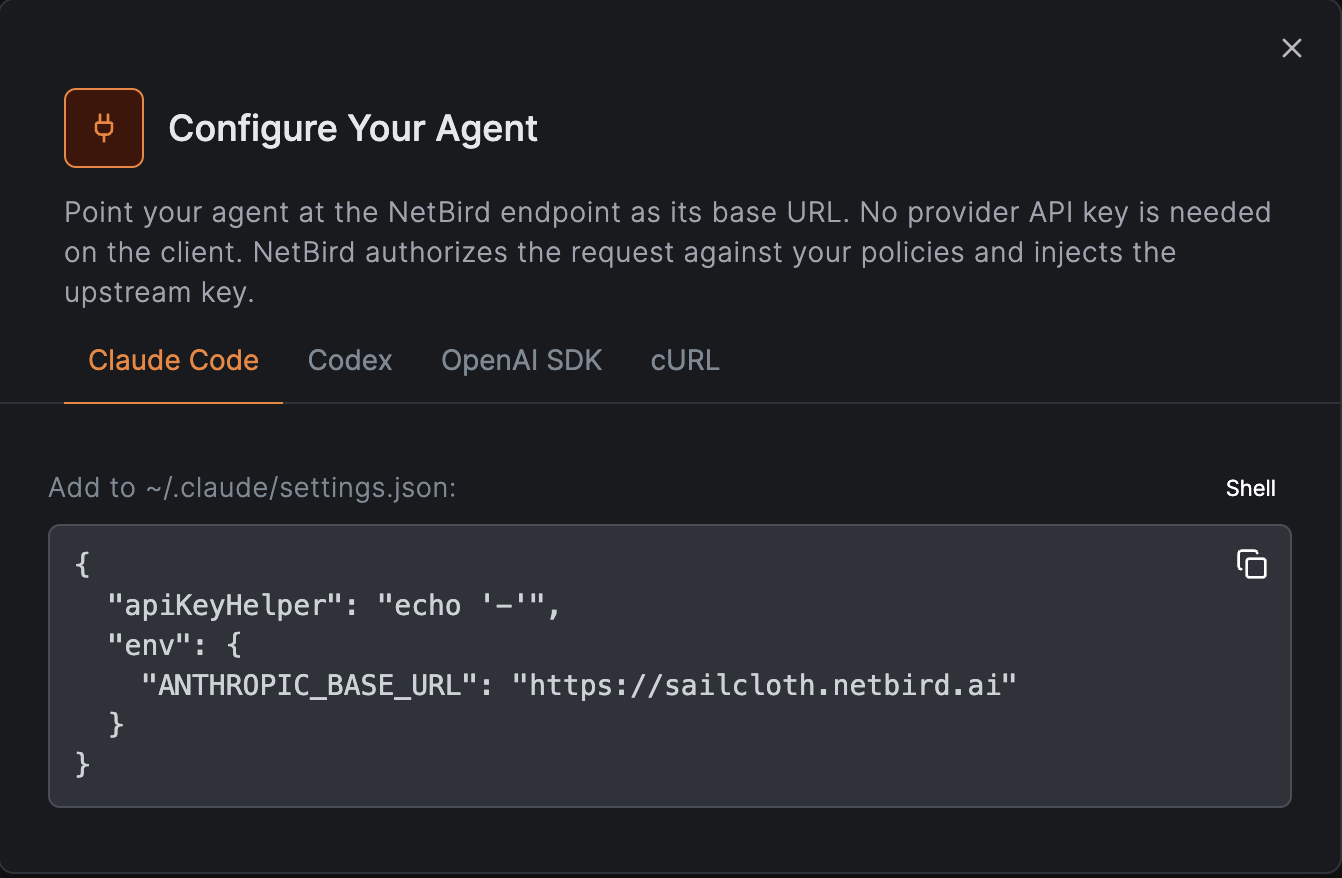
And notice what's not in that config: there's no API key. The tunnel is the credential.
Policies, Limits, and Guardrails
A policy is what connects a Source Group (your users or agent devices, straight from your IdP) to one or more providers. No policy, no access, that's the default-deny part. When you create one you can also attach limits and guardrails.
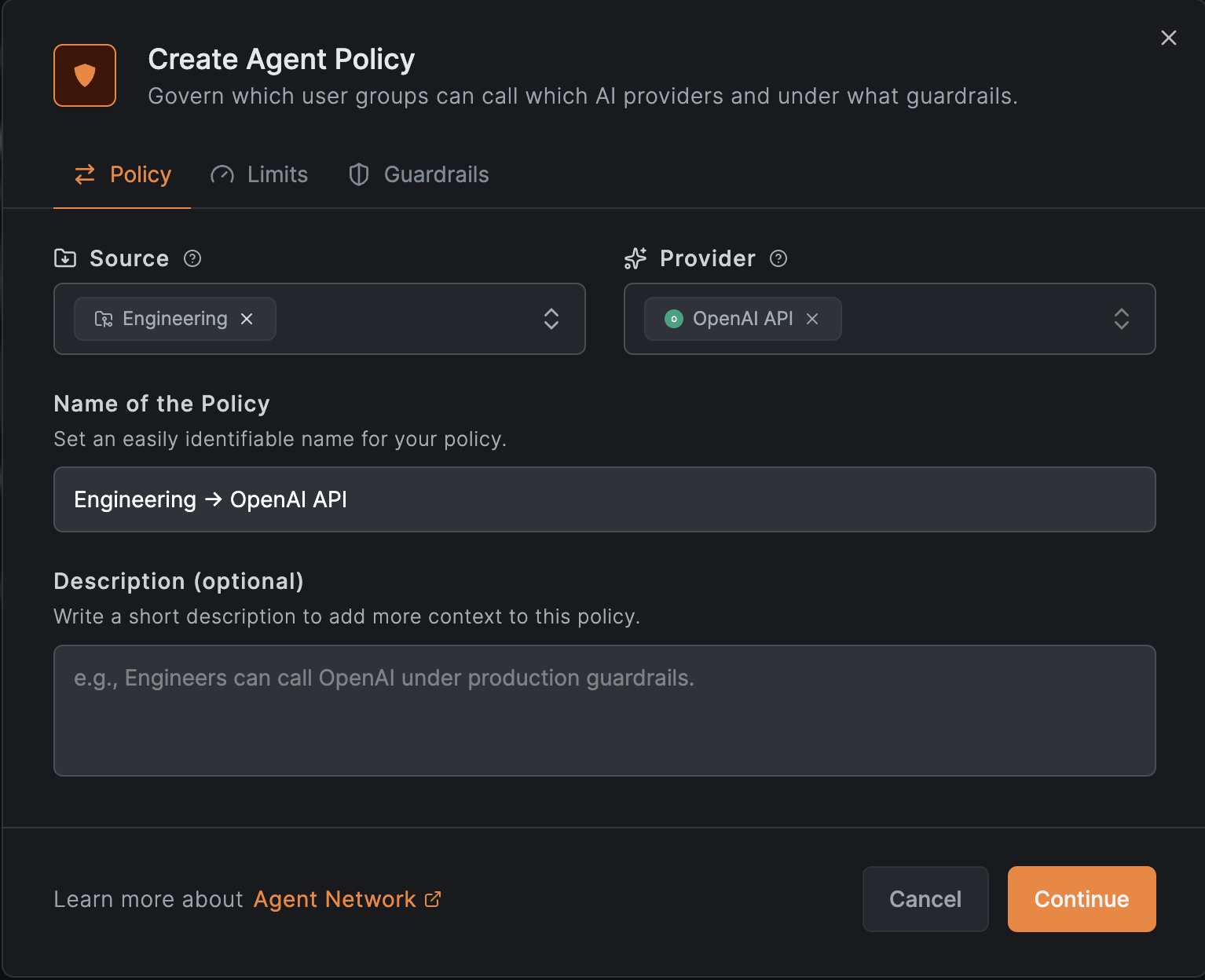
One thing worth being upfront about: pulling users and groups in automatically with IdP sync is a Cloud and Enterprise feature. Everything else here is open source and self-hostable. And even without IdP sync you're not stuck, you can still invite users by hand and manage their group and policy access manually. You just do the group assignment yourself instead of letting Okta, Microsoft Entra ID, or Google do it for you.
Limits come in two flavors, and you can set each one per user and per group:
- Token caps: maximum tokens over a fixed time window.
- Budget caps: maximum spend in USD over a fixed time window.
There are also Global Limits, which are account-wide ceilings that apply across every policy and every provider. Think of them as a backstop. A global limit can only tighten what a policy allows, never loosen it, so adding one is always safe. Do note that the caps are checked before each request against what's already been used, so a single request can nudge you just past the line. The request that crosses it still completes, and the next one gets blocked. Plan your caps with a little headroom if you need a strict ceiling.
Guardrails are checks you attach to a policy:
- A model allowlist, so a group can only hit the models you approve. Anything else gets denied.
- Prompt capture, to optionally store the prompt and completion on logged requests.
- PII redaction, which strips sensitive data out of those prompts and completions before they're stored.
See It in Action
Once you're connected with the NetBird client, you point your agent at the endpoint and that's it, no key anywhere. In the demo, dropping the Claude Code snippet into , switching to a model the policy allows, and asking it "what is NetBird?" returns an answer, all over the tunnel, with the desktop authenticated through the IdP. No connectors, no API key in sight, just the keyless agent network doing its thing.
Taking access away is just as quick. Take a marketing group's policy: flip a model off the allowlist in its guardrail, hit save, and ask the same question again, and instead of an answer you get a clean API error saying the model isn't on the policy's allowed list. Add it back, and access returns in seconds. You can also disable the whole policy outright, or, with IdP sync, move the user out of the group entirely. When someone is terminated or moves to a different team, their access follows automatically. There's no key to hunt down and no config file to scrub.
That's the whole point: access is tied to identity, not a key sitting in a config file somewhere.
Usage and Logs
Once traffic is flowing, you get a real per-request audit. Token and cost usage is always recorded, every served request, with the caller's identity, the provider, the model, tokens, and cost. That's what powers the usage dashboards and keeps your limit counters accurate, and it sticks around regardless of your logging settings.

On top of that, the full access log adds the per-request detail: method, path, status, duration, and the prompt and completion when capture is on. Denied requests show up too, with a clear reason like "Model not allowed" or "Token limit exceeded," so you're never guessing why something got blocked. Log collection is on by default, you can set a retention period from 7 to 90 days or keep them indefinitely, and you can filter the whole thing by user or group.
Keeping It Honest
A couple of things worth being straight about. This is a new feature, but it isn't new plumbing. The heavy lifting is done by the reverse-proxy code that's already merged into main and running in production, and we've been using Agent Network on it internally for weeks. It's a new wrapper on proven plumbing, not a from-scratch system.
And on availability: for now Agent Network is self-hosted only. It hasn't landed in NetBird Cloud yet, that's coming, so the way to try it today is to stand up your own deployment, which is exactly what the next section walks through.
The guardrails today are the model allowlist, prompt capture, and PII redaction, all on captured logs. There's a roadmap beyond that, the proxy is built as extensible middleware, so things like forwarding to a SIEM or calling out to an external check are on the table. A team-usage leaderboard, to see who's actually putting the tokens to work, came straight out of our own internal testing and is on the list too. We'd rather be clear about what it does today than oversell what's coming, but those are the directions we're headed.
Self-Host It
Agent Network is open source and self-hostable, and the bar to get going is low. You need a Linux VM with at least 1 CPU and 2 GB of RAM, public on TCP 80/443 and UDP 3478, plus a public domain with a wildcard DNS record so the endpoints resolve. Then it's one line:
That spins up a minimal NetBird deployment with the core Agent Network functionality, and you can enable the full platform later. From there you create your admin account, add your device, connect a provider, write a policy, and make your first keyless call. The Quickstart walks through the whole thing end to end.
Already running NetBird? You don't have to redeploy anything. Agent Network ships in the same backend, so you just set an environment variable on your dashboard and it shows up in the left-hand menu, right alongside the reverse proxy. Set to turn it on next to everything else, or if you'd rather have the stripped-down, Agent-Network-only dashboard instead. Don't want it at all? There's nothing to do, leave both unset and it stays off. The command above is really just the fast path for people coming purely for the LLM and agentic-access use case, who'd rather not stand up the whole network platform just to try it.
And if you want the backstory on how all of this came together, keep an eye out, we've got an interview with our CEO Misha coming very soon that digs into the why behind Agent Network.
Get Started
- Agent Network overview: What is NetBird Agent Network?
- Quickstart: Deploy and make your first keyless call
- How it works: Architecture and the request lifecycle
- Providers: Connect LLM APIs, gateways, and local models
- Try NetBird: Get started at netbird.io/pricing
Join the community: