
If you're self-hosting anything right now, you've probably dealt with the headache of making your services accessible from outside your network. Port forwarding, reverse proxy configs, Cloudflare Tunnels. It works, but it comes with trade-offs. Either you're managing TLS certificates and security hardening yourself, or you're handing your traffic to a third party.
With NetBird v0.65, that's no longer the trade-off. We've built a reverse proxy directly into the management server. Point a custom domain at your NetBird server, configure the proxy in the dashboard, and your internal services are securely accessible from any browser. No VPN client required for end users. TLS, authentication, and routing are all handled by NetBird through encrypted WireGuard tunnels, fully self-hosted and fully under your control.
Why Not Just Use Cloudflare Tunnels?
Cloudflare Tunnels is free, easy to set up, and popular for good reason. But there's a fundamental trade-off most people overlook: all of your traffic flows through Cloudflare's infrastructure. They're terminating your TLS. They can see your traffic. That's a man-in-the-middle by design.
On top of that, Cloudflare's free plan has data transfer limits that make it a non-starter for media streaming or large file transfers. Services like Plex, Jellyfin, or Nextcloud can hit those limits fast. With a self-hosted NetBird deployment, there are no bandwidth restrictions beyond what your own infrastructure can handle. You own the proxy, you own the limits.
You also get something Cloudflare doesn't offer: built-in authentication at the proxy layer. SSO through your existing identity provider, shared passwords, PIN codes, or a combination of all three. No extra services to bolt on, no additional configuration.
Add a Service
Expose any internal service by selecting a subdomain and adding one or more backend targets. Each target points to a peer or resource on your network.
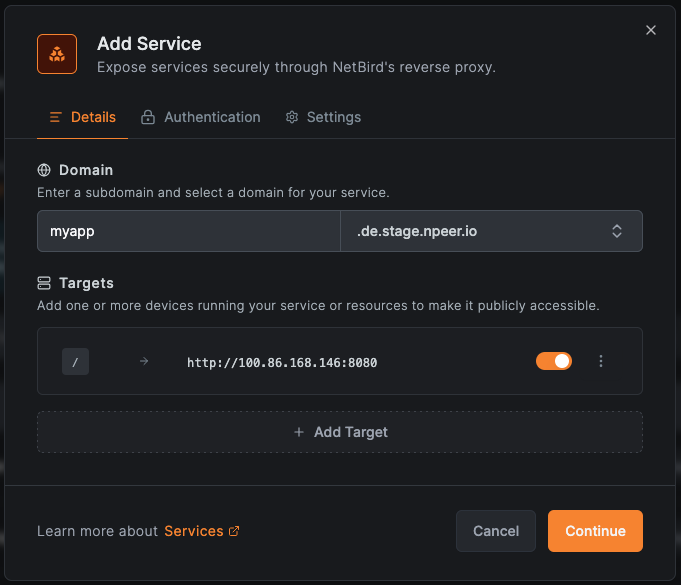
From the Reverse Proxy section in the dashboard, click Add Service and configure the subdomain and target. You can add multiple targets to a single service and use path-based routing to send different URL paths to different backend services. For example, to your web app, to a separate backend, and to a documentation server, all under a single domain.
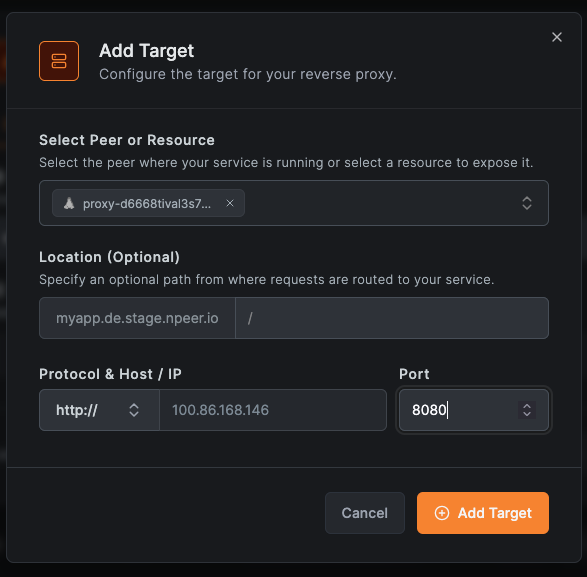
Custom Domains
Bring your own domain by adding a CNAME record pointing to your NetBird proxy cluster. NetBird handles TLS certificate provisioning automatically.
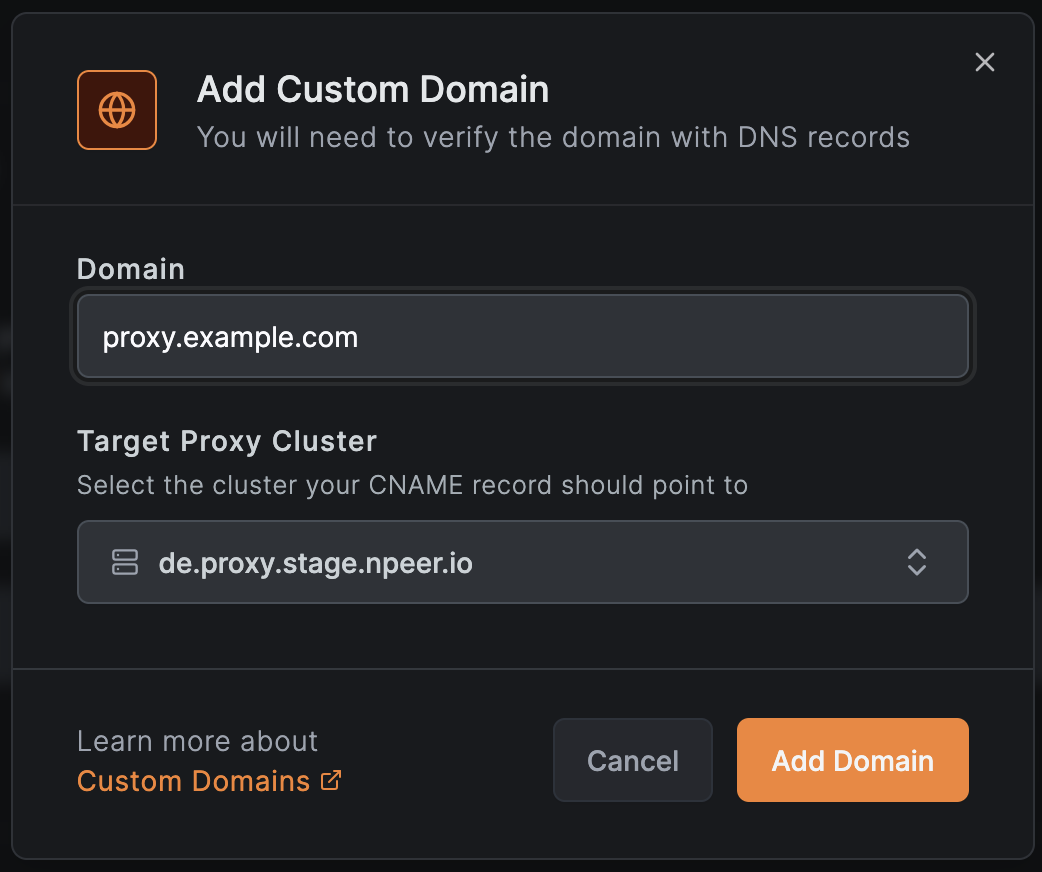
To add a custom domain:
- Navigate to Reverse Proxy → Custom Domains
- Click Add Domain
- Enter your domain name
- Add a CNAME record at your DNS provider pointing to your NetBird proxy
- NetBird validates the CNAME and provisions a TLS certificate automatically
Learn more in the Custom Domains documentation .
Authentication
Secure your exposed services with multiple authentication methods. Enable one or combine several for layered protection.
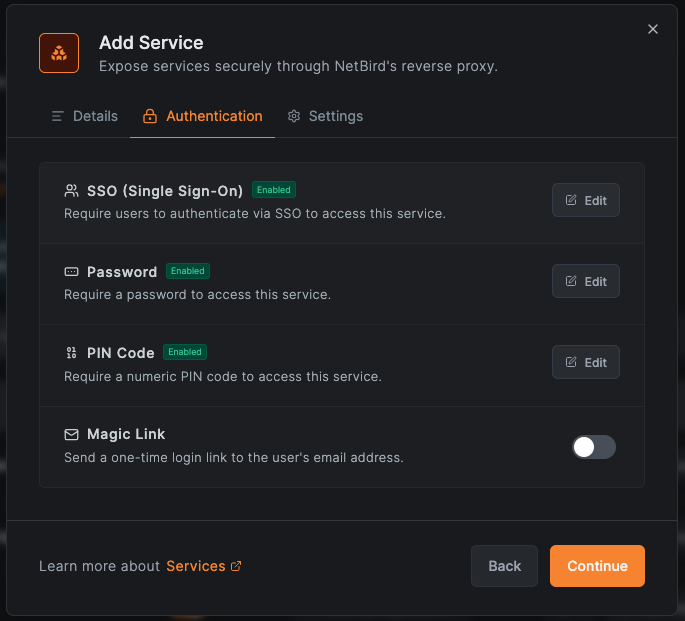
- SSO - Authenticate users through your configured identity provider. Optionally restrict access to specific user groups, so your dev team sees dev tools and your sales team sees their dashboards.
- Password - Set a shared password for simple access to internal tools or for external collaborators who aren't in your IdP.
- PIN Code - Protect services with a numeric PIN for quick, lightweight access control.
- No authentication - Expose services publicly when needed (use with caution).
You can combine methods on the same service. For example, enable both SSO and a shared password so team members authenticate with SSO while external partners use the password. Sessions are managed using JWT tokens, so users authenticate once and stay connected without repeated prompts.
Learn more in the Authentication documentation .
Settings
Each service has additional options for controlling how the proxy handles requests.
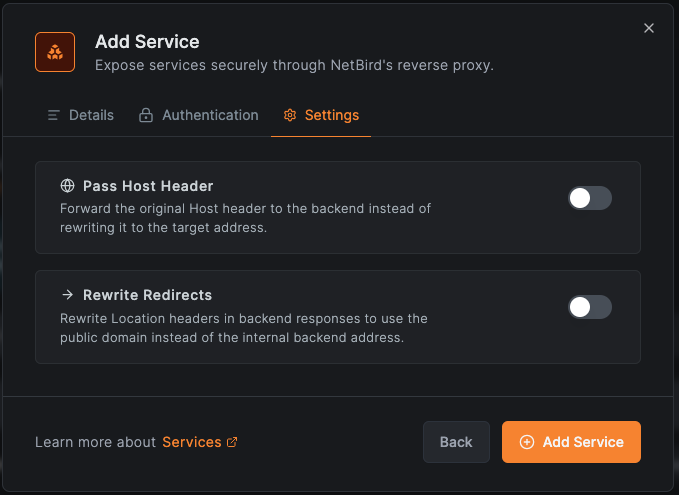
- Host header passthrough - Forward the original Host header to your backend instead of the internal hostname. This is important for services that rely on the Host header for routing, virtual hosting, or WebAuthn validation.
- Redirect rewriting - Rewrite redirect URLs in backend responses to use the public domain, preventing users from being sent to internal addresses they can't reach.
Self-Hosted Improvements
Version 0.65 also introduces a unified NetBird server binary that consolidates multiple services into a single container for self-hosted deployments. This means fewer containers to manage, simpler Docker Compose stacks, and faster setup. If you're running an existing deployment, the quick start script has been updated and we've published a migration guide to walk you through enabling the reverse proxy on your current installation.
We've also switched the default reverse proxy in the quick start script from Caddy to Traefik. Traefik is required for the reverse proxy feature because it supports TLS passthrough, which lets the NetBird proxy handle TLS termination directly.
Cloud Support Coming Soon
The reverse proxy is currently available for self-hosted deployments only. Cloud support with hosted reverse proxy nodes is on the way and should be available within the next couple of weeks. Follow us on X or join our Slack to get notified when it's ready.
Other Improvements
This release also includes enforced access control on the accessible peers endpoint, a cloud API spec added to the public OpenAPI definition, an early message buffer for the relay client to prevent message loss during connection establishment, and a refactored relay connection container for improved reliability. Full details are in the GitHub release notes .
Get Started
- Reverse Proxy docs: Reverse Proxy Overview
- Custom Domains: Custom Domains documentation
- Authentication: Authentication documentation
- Try NetBird: Get started at netbird.io/pricing
Join the community: