
When we shipped the built-in reverse proxy in v0.65, the whole point was exposing internal services to the outside world with authentication in front. SSO, passwords, PIN codes. That works great for services you actually want reachable from anywhere.
But a lot of internal tools should never touch the public internet at all. Your monitoring dashboards, internal wikis, admin panels. You still want the nice parts of the proxy, a clean domain, automatic TLS, one place to manage everything, you just don't want a public endpoint sitting out there.
That's what v0.72 brings. Private services with NetBird-Only access: services exposed through the reverse proxy that are reachable exclusively over your NetBird network, gated by group membership instead of a login page.
And alongside it, the Bring Your Own Proxy dashboard UI we teased in the v0.71 post is here. The backend shipped last release and dashboard v2.39.0 opens it up in the UI with a full cluster setup flow. These two features go hand in hand, and I'll get into why in a bit.
NetBird-Only Access
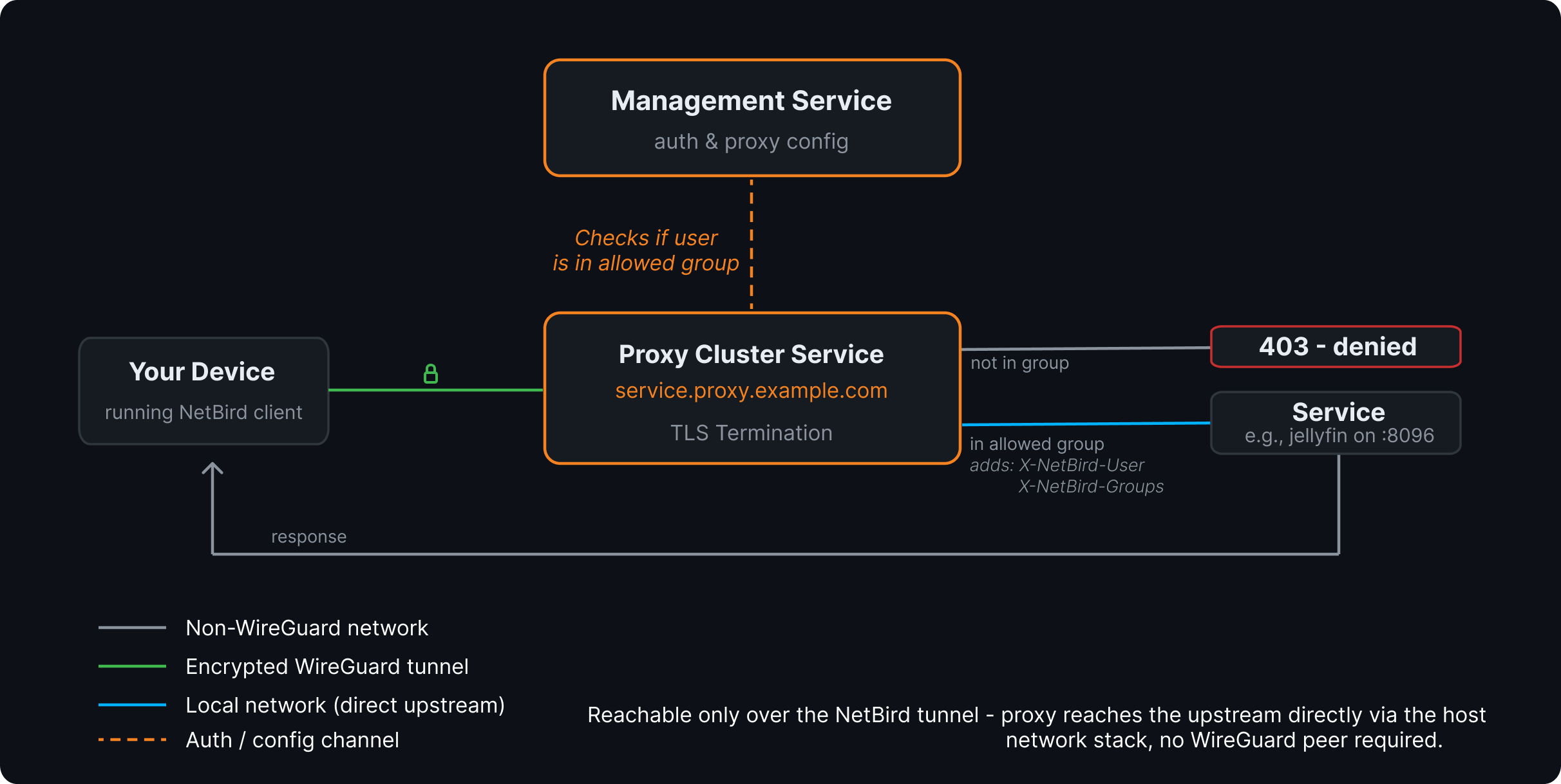
NetBird-Only is a new access mode alongside SSO, password, and PIN. When you flip a service to NetBird-Only, it stops being served publicly. Instead, the proxy serves it on an inbound listener bound directly to its WireGuard tunnel, so the only way to reach the service is from a peer inside your NetBird network.
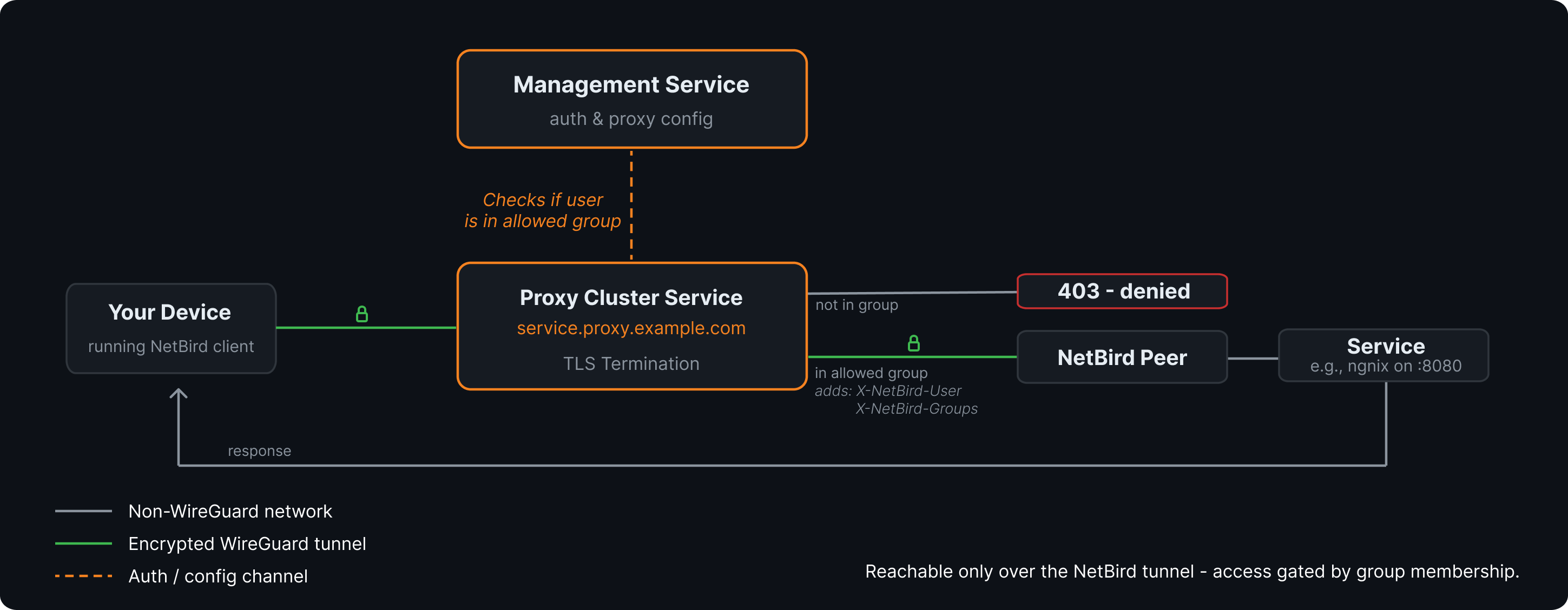
There's no login prompt and no credentials to configure. The connecting peer's identity is the credential. When a request comes in over the tunnel, the proxy resolves the source address back to a NetBird peer and asks the management server to validate it. Management checks the peer's groups against the access groups you've configured for the service. Not in an allowed group, you get a 403. Requests that don't come from a peer in your account don't get in at all.
You pick at least one access group when enabling it (the save button stays disabled until you do), and yes, the All group is selectable, so you can make a service reachable from every peer in your network if that's what you want.
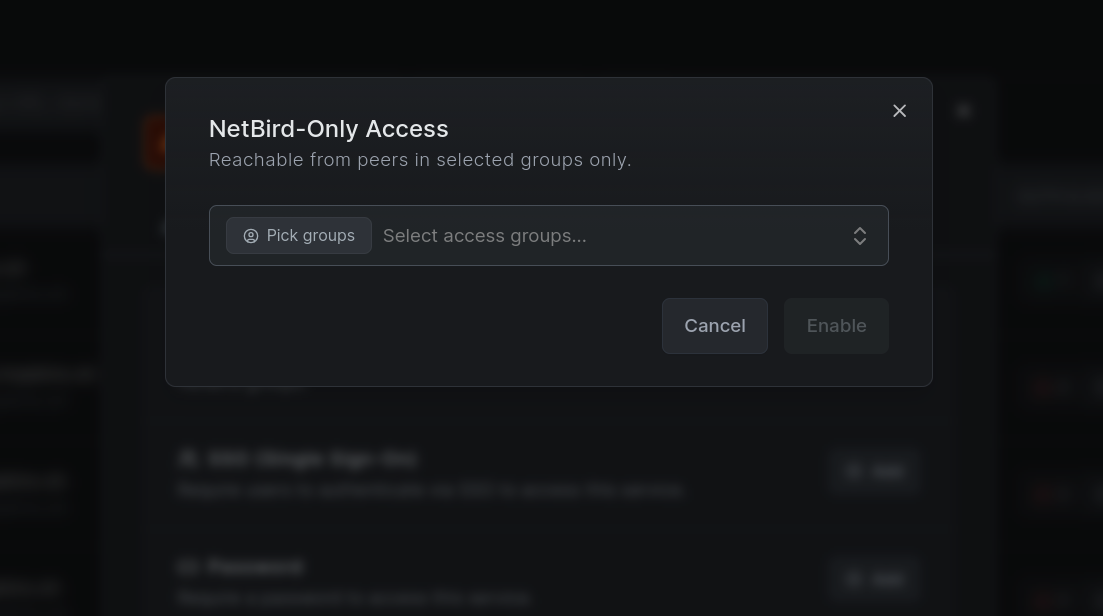
Do note, NetBird-Only is mutually exclusive with the operator auth methods on the same service. The WireGuard tunnel is the trust boundary, so when it's enabled, the SSO, password, and PIN options go away. If you need one backend reachable both privately and publicly, expose it as two services on different subdomains. It's also HTTP services only; for L4 services, access restrictions are still the tool.
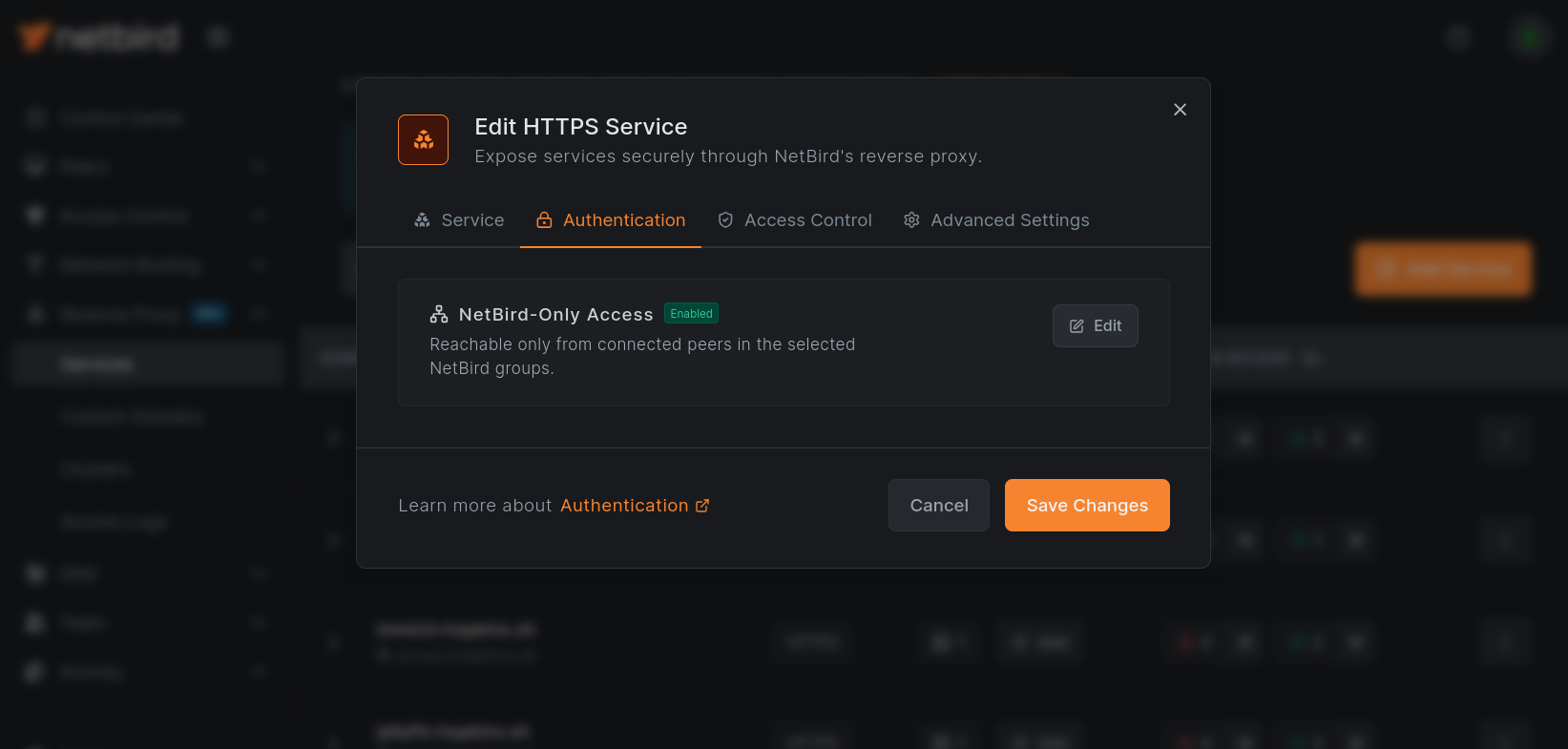
Behind the scenes, NetBird synthesizes the DNS records and access policies for you. The service domain resolves inside your network automatically, and only peers in the right groups can reach the proxy. No manual DNS entries, no hand-written policies, it's all derived from the service config.
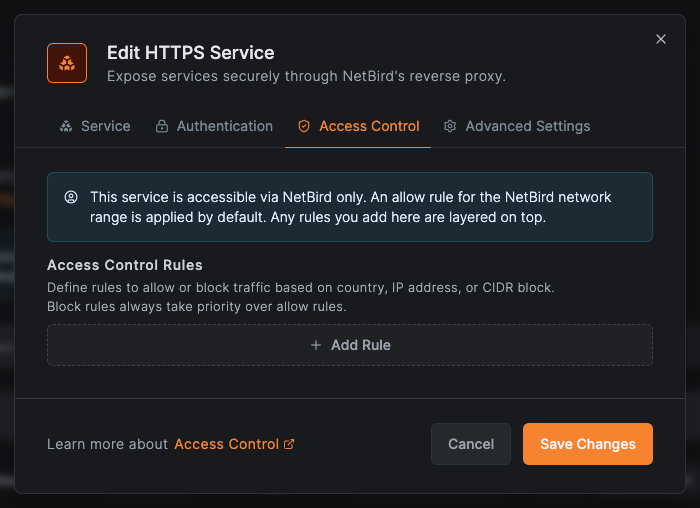
The Access Control tab reflects this too: a NetBird-only service gets an implicit allow rule for the NetBird network range by default, and any CIDR rules you add are layered on top. Country and CrowdSec checks are skipped on the overlay path, since the source is always a NetBird address with no meaningful geo or reputation data to check.
Your Apps Know Who's Connecting
Since the proxy already knows which peer and user is behind each request, it passes that along. Requests to your backend get stamped with two headers:
- - the calling user's email, or the peer name if the peer isn't attached to a user
- - a comma-separated list of the groups the user belongs to
These headers are stamped onto the request after access is already granted. They're informational for your backend, not part of the access decision, that all happens through the tunnel peer validation above. So your apps can do their own per-user authorization or just log who did what without bolting on a separate auth layer. And any client-supplied versions of these headers get stripped before the proxy stamps its own, so nobody can impersonate a user by setting the header themselves.
This shows up in the dashboard too. Proxy event logs now display peer-aware identity for private services, and you can expand any event to see the full per-request metadata as JSON. Real nice for figuring out exactly what happened when something doesn't behave.
Bring Your Own Proxy, Now in the Dashboard
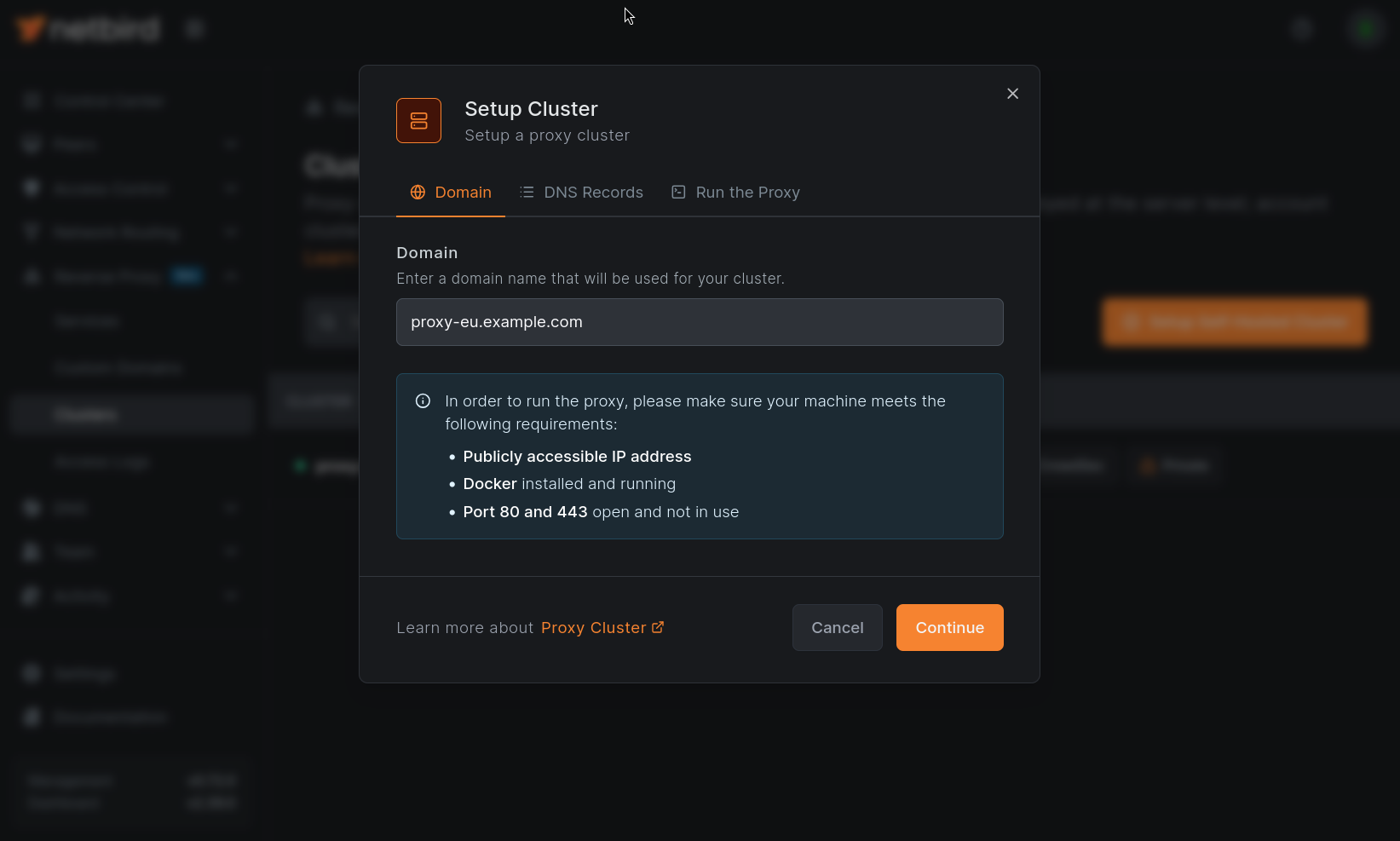
In the v0.71 post I mentioned the Bring Your Own Proxy backend was ready but the dashboard UI was still being polished. That UI is now live. From the Clusters page you can register your own proxy cluster, generate a token, and walk through a guided setup flow. It's three steps: pick a domain for your cluster, set up the DNS records, and run the proxy.
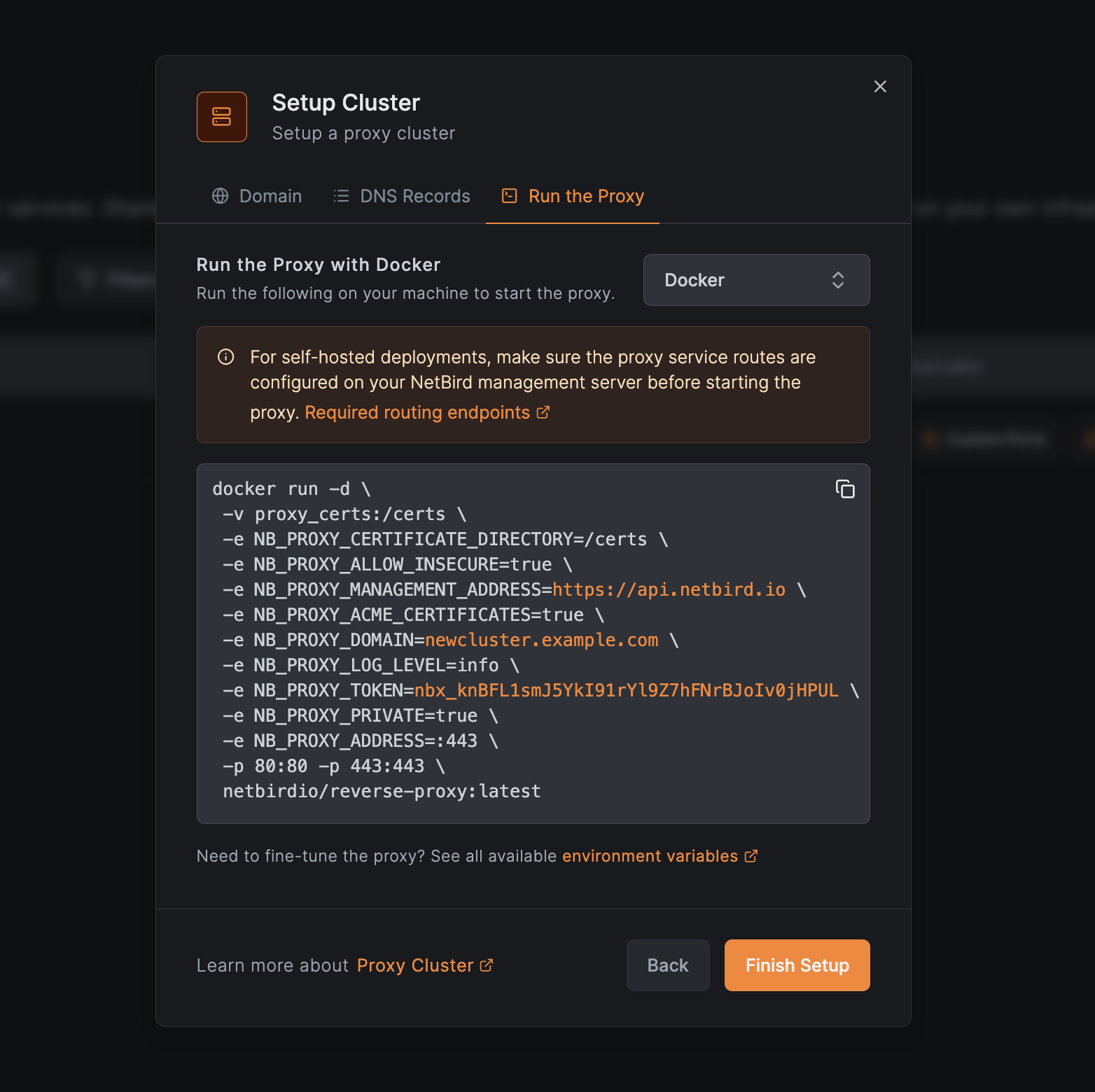
The "Run the Proxy" step offers Docker, Docker Compose, and Kubernetes deployment options, each generating equivalent config with your management URL, domain, and token already substituted in. Self-hosted deployments get a routing notice reminding you to wire the proxy into your existing reverse proxy config, plus a link to the full environment variable reference for tuning.
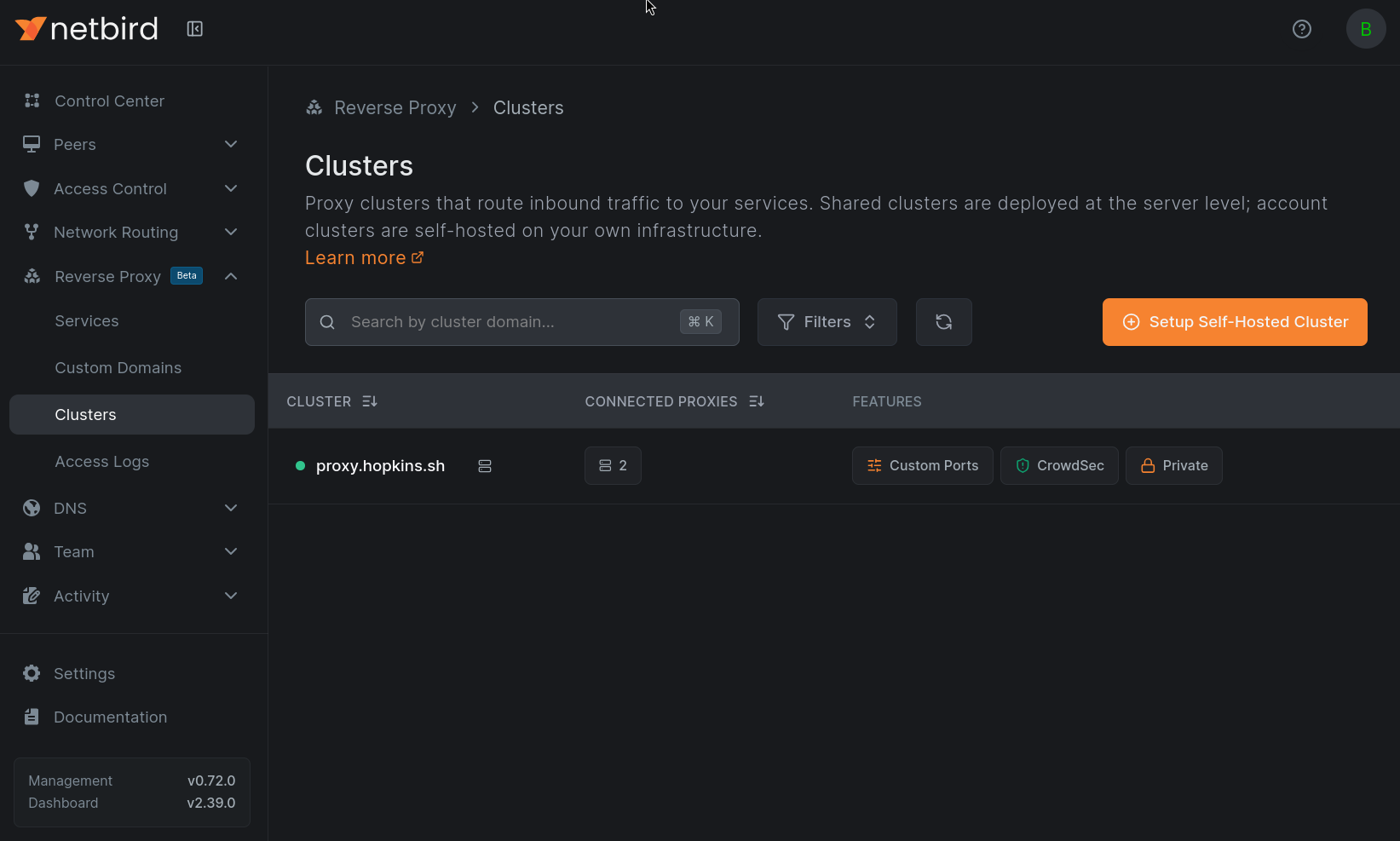
The Clusters page shows each cluster's type (Account for clusters you own, Shared for platform-managed ones), its online status, and feature badges for the capabilities its proxies report: Custom Ports, Subdomain Required, CrowdSec, and the new Private badge.
That Private badge is where this all connects. Here's the part to pay attention to: NetBird-Only access requires a cluster with the Private capability, which a proxy reports when it runs in embedded mode with the flag (or ). NetBird Cloud's shared clusters don't currently advertise it, so running your own BYOP cluster is the way to enable private services on Cloud. Same deal for self-hosted: the proxy needs to be running with the flag set, and I cover adding it to your in the upgrade steps below . If your selected domain's cluster doesn't have the capability, the NetBird-Only option is greyed out in the dashboard with a tooltip explaining why.
Direct Upstream Targets
v0.72 also adds a per-target Direct Upstream option. Normally the proxy reaches your backend through the embedded NetBird client over WireGuard. With Direct Upstream enabled, it dials the target through the proxy host's own network stack instead, which is the right move when the backend is sitting on the same host or network as the proxy and doesn't need the tunnel hop.
There's also a new Proxy Cluster target type that points a service at a hostname or IP the proxy can resolve directly from its own host, with Direct Upstream locked on automatically. The service is still only reachable over the NetBird tunnel and still gated by group membership, but no WireGuard peer is needed between the proxy and the backend. Real handy when the upstream is co-located with your BYOP proxy.
Upgrading a Self-Hosted Deployment
If you're self-hosting with the built-in Traefik setup from the quick start script, there's one required change before you upgrade: the gRPC router needs to route the proxy's new gRPC service through the h2c backend. Without it, proxy registration falls through to the HTTP/1 backend router and breaks.
In your , find the label on the service and add the third :
Replace with your domain.
Then, if you want your proxy to support private services, drop the private flag into your :
This is what gives the cluster its Private capability and unlocks NetBird-Only access in the dashboard. It's not generated by the quick start script, so you need to add it yourself. Skip it if you don't need private services.
From there it's the usual:
Only and the proxy get recreated, the rest keeps running. To verify the proxy registers over the new gRPC route, check the logs:
You're looking for on the proxy and on the server. If you see those, you're good to go.
Also in v0.72
Private services and BYOP are the headline, but there's a good amount of other stuff in this release.
Dashboard layout refresh. The navigation got a simplified layout, setup keys moved into Settings, and Networks and Routes are now grouped together under Network Routing. Peers are now split into User Devices and Servers, so your laptops and phones live separately from the VMs, agents, and other unattended machines typically enrolled with a setup key. Table filters got a cleaner layout too. If things look a little different after you upgrade, that's why.
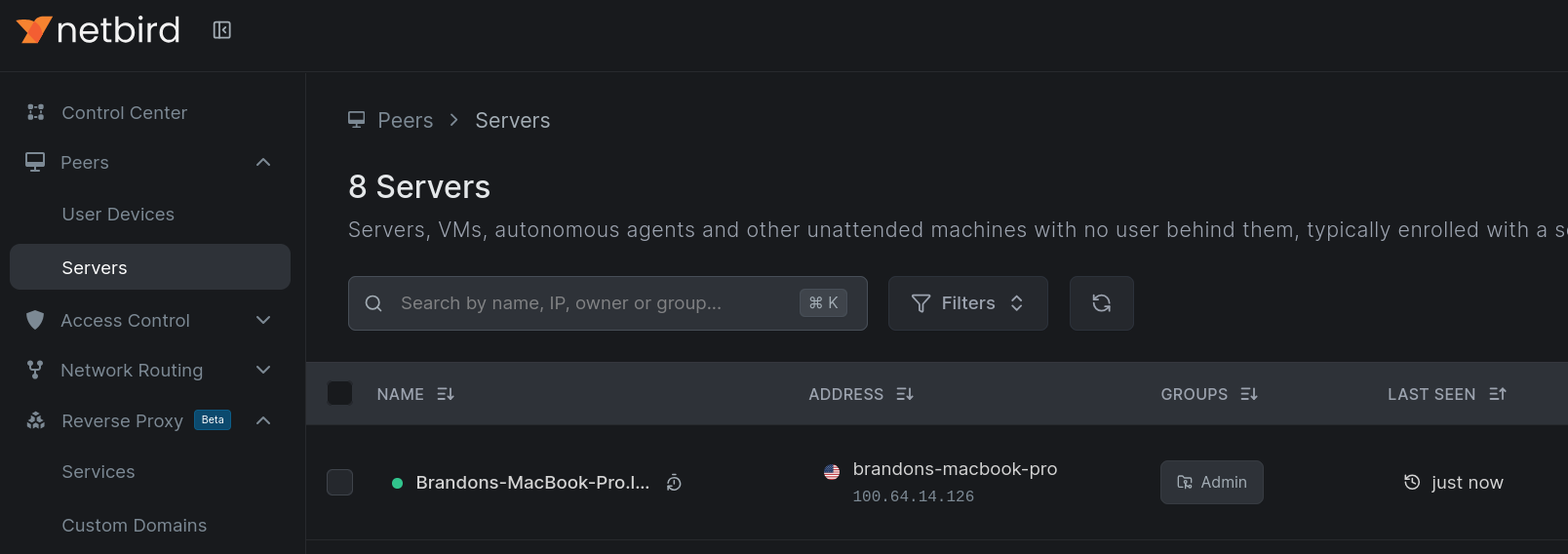
SSO session extend flow. Management now supports extending SSO sessions, so users don't get bounced to re-authenticate as often.
Client improvements. A handful of items worth scanning:
- DNS wildcard handlers now match on label boundaries, so behaves the way you'd expect instead of matching lookalike domains.
- Fixed a possible deadlock in the state manager on shutdown.
- Log rotation no longer risks corruption from competing writers, and debug bundles got better.
- The WireGuard port can be set to zero (random) in the UI, and now shows the port in use.
- Sync responses are persisted through a pluggable store, including disk support on iOS.
- The DNS forwarder is now gated on the Block Inbound setting.
- Improved Rosenpass support and an Android default-gateway workaround.
Management fixes. Owner role updates work correctly again, and there's been a solid round of internal refactoring on server bootstrap and permissions context.
Full details are in the GitHub release notes .
Learn More and Connect
- NetBird-Only Access docs: Reverse Proxy Authentication
- Service configuration: Service Configuration
- Bring Your Own Proxy: BYOP documentation
- Full changelog: v0.71.4...v0.72.0
- Try NetBird: Get started at netbird.io/pricing
- Join the community: Star us on GitHub · Follow us on X