
Hello NetBird Community!
This last month was a big one on the product side. We shipped two major releases back to back, v0.71 brought IPv6 to the overlay and v0.72 added private NetBird-Only services to the reverse proxy, plus a one-click NetBird install on the Vultr Marketplace. We also just shipped something brand new for Kubernetes and we want your feedback on it, so let's start there.
New: API Server Proxy for the Kubernetes Operator, and We Want Your Feedback

We just shipped the API server proxy for the NetBird Kubernetes Operator. Cluster access routes through your NetBird network, your NetBird identity and groups carry through to Kubernetes authorization, and there are no tokens or certs stored on your machine.
This one is brand new and we're actively looking for feedback. If you're running Kubernetes, please take a minute to fill out the form below, the team reads everything that comes in.
Learn more: API server proxy docs
Share your feedback: Kubernetes Operator feedback form
NetBird v0.72 - Private Services and Bring Your Own Proxy
When we shipped the built-in reverse proxy, the whole point was exposing internal services to the outside world with SSO, passwords, or PIN codes in front. That's great for things you actually want reachable from anywhere. But a lot of internal tools, your monitoring dashboards, internal wikis, admin panels, should never touch the public internet at all.
That's what v0.72 brings. Services with NetBird-Only access are reachable exclusively over your NetBird network, gated by group membership instead of a login page. There's no login prompt and no credentials to configure, the connecting peer's identity is the credential. Not in an allowed group, you get a 403. You still get the nice parts of the proxy, a clean domain and automatic TLS, just without a public endpoint sitting out there.
This release also ships the Bring Your Own Proxy dashboard UI we teased in the v0.71 post, with a full cluster setup flow.
Learn more: Knowledge Hub article
NetBird v0.71 - IPv6 Overlay Addressing
The overlay has been IPv4-only since day one, with every peer, ACL, and route living in . v0.71 changes that. The overlay is now dual-stack: each account gets its own unique IPv6 prefix, peers can receive both a v4 and a v6 address, and the rest of the system follows along, DNS, firewall rules, exit nodes, and routes.
Best of all, the rollout is group-gated, so IPv6 isn't force-fed to everyone on upgrade. Existing accounts opt in by picking which groups get IPv6 under Settings > Network, so you can pilot it, confirm things look right, then widen the scope.
Learn more: Knowledge Hub article
NetBird Partners with Vultr
We've teamed up with Vultr to make self-hosting NetBird easier than ever. NetBird is now an official one-click app on the Vultr Marketplace , with all of our recommended defaults baked in. You provide a domain and an email, set two DNS records, and the install script handles the rest. No terminal required, and it's no stripped-down demo either, you get Traefik with automatic TLS, the NetBird server and dashboard, the reverse proxy on by default, and CrowdSec wired in.
Learn more: Knowledge Hub article
NetBird Now Runs Natively on Unraid
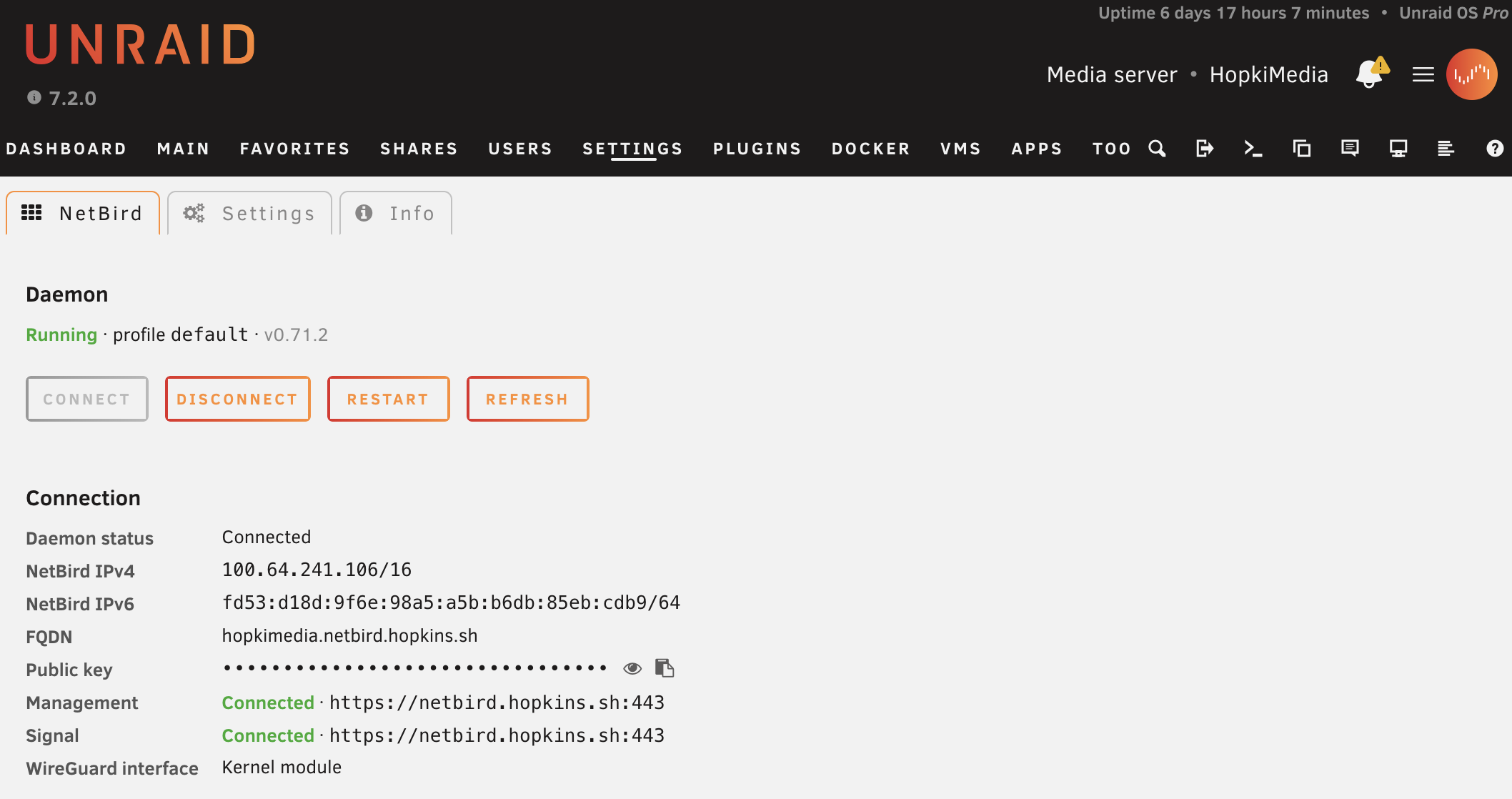
Unraid users, this one's for you. We shipped an official NetBird plugin that runs natively on Unraid OS, no Docker container required, so the host itself joins your network as a peer. You install it straight from the Plugins page and manage everything from a built-in web GUI with Settings, Status, and Info pages plus a dashboard tile. It supports multiple profiles for different NetBird instances, persists your config across reboots, and hooks into Unraid's own init system instead of systemd.
Learn more: GitHub repository
Community Highlights
We love seeing what the community builds and writes about NetBird. This month, Antonio Distefano over at Homelabz published a great write-up on self-hosting NetBird and migrating his homelab off Tailscale, a Proxmox cluster running 14 containers across 3 subnets that he moved over in about 12 minutes. It's a nice real-world look at the self-hosted experience (in Italian, but it translates well).
Read it: The original self-hosted NetBird review on Homelabz
Over on YouTube, Jason's Lab put together NetBird VPN & Pi-Hole DNS Setup!, a quick little video setting up Pi-hole in a VM and wiring it into NetBird so your phones, and whole groups, get filtered DNS wherever they are. It's a clean, practical walkthrough if you've been meaning to run network-wide ad-blocking across your overlay.
Watch it: NetBird VPN & Pi-Hole DNS Setup! on Jason's Lab
Thank You!
Thank you for being part of the NetBird community. Your feedback, GitHub issues, and ideas continue to shape what we build. If you haven't already, come hang out with us on Slack or star us on GitHub .
Team NetBird
Check out the changelog to stay on top of all the product releases. Follow NetBird on LinkedIn !