
Native SSH Implementation
NetBird v0.60.0 introduces a complete rewrite of our SSH feature from the ground up, transforming how organizations and home lab enthusiasts manage secure remote access. The new implementation brings native OpenSSH client support, identity-aware authentication, and advanced capabilities that align with modern zero-trust security principles.
Managing SSH access traditionally means collecting public keys from every user, manually injecting them into authorized_keys files, tracking access across servers, and removing keys when people leave. For organizations with dozens of servers and frequent team changes, this becomes an operational nightmare—one missed key removal during offboarding creates a security vulnerability.
Meanwhile, automation systems like Ansible and CI/CD pipelines often require jump hosts positioned near target infrastructure just to establish connectivity, adding unnecessary complexity to deployment workflows.
What Changed: From Simple to Sophisticated
The Old Model: Easy but Limited
Our previous SSH implementation (v0.59.x and earlier) followed a straightforward approach:
- Simple two-step toggle: Enable SSH on the agent, flip a switch in the dashboard, and you're connected
- Machine-based access: If a machine had network access, it had SSH access
- Proprietary clients: Access required using NetBird's CLI or browser-based SSH client
This worked, but user feedback consistently pointed to the same limitation: lack of flexibility. Teams wanted to use the tools they already knew—their native SSH clients, existing scripts, and familiar workflows. They needed granular control over who could access what, when, and under what conditions.
The New Model: Zero-Trust and Identity-Aware
NetBird SSH v0.60.0 is a complete rewrite built with modern zero-trust principles:
Native OpenSSH Integration: You can now run standard SSH commands like directly from your terminal. No special commands, no custom clients—just the SSH workflows you already know. NetBird seamlessly integrates with OpenSSH through automatic configuration, handling authentication and server detection transparently in the background.
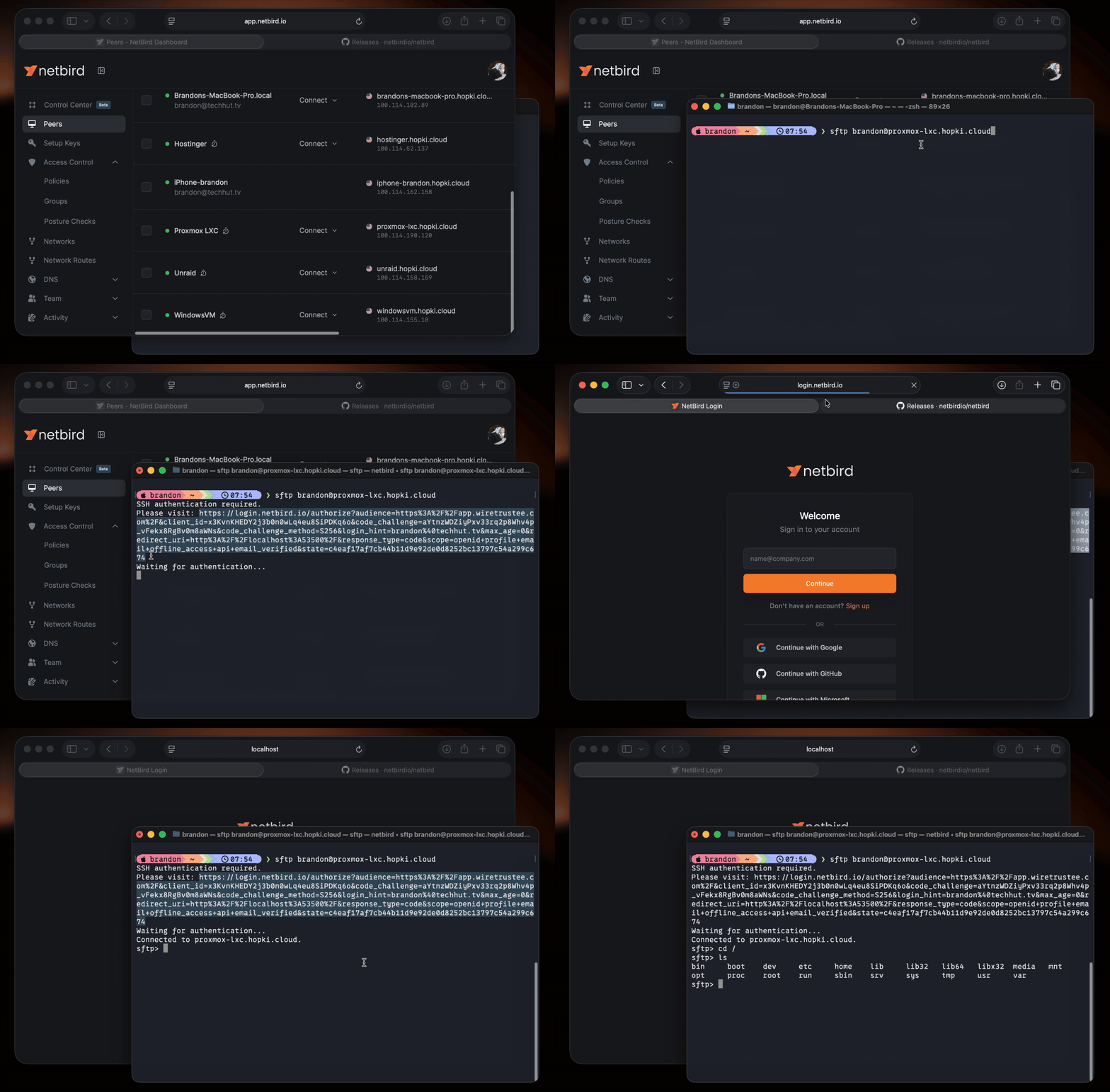
Identity-Based Authentication: When you first connect to a NetBird SSH server, you're prompted to authenticate via an OIDC flow with your organization's Identity Provider (Okta, Google Workspace, Microsoft Entra ID, etc.). This creates an SSH session authenticated as you—not as a machine, not as a generic service account, but as your actual user identity.
This enables:
- Audit trails show exactly which person accessed which server
- Centralized user management through your existing IdP
- Automatic off-boarding: Once someone leaves the organization and loses IdP access, they automatically lose SSH access across all servers
- Conditional access policies can be enforced through your IdP
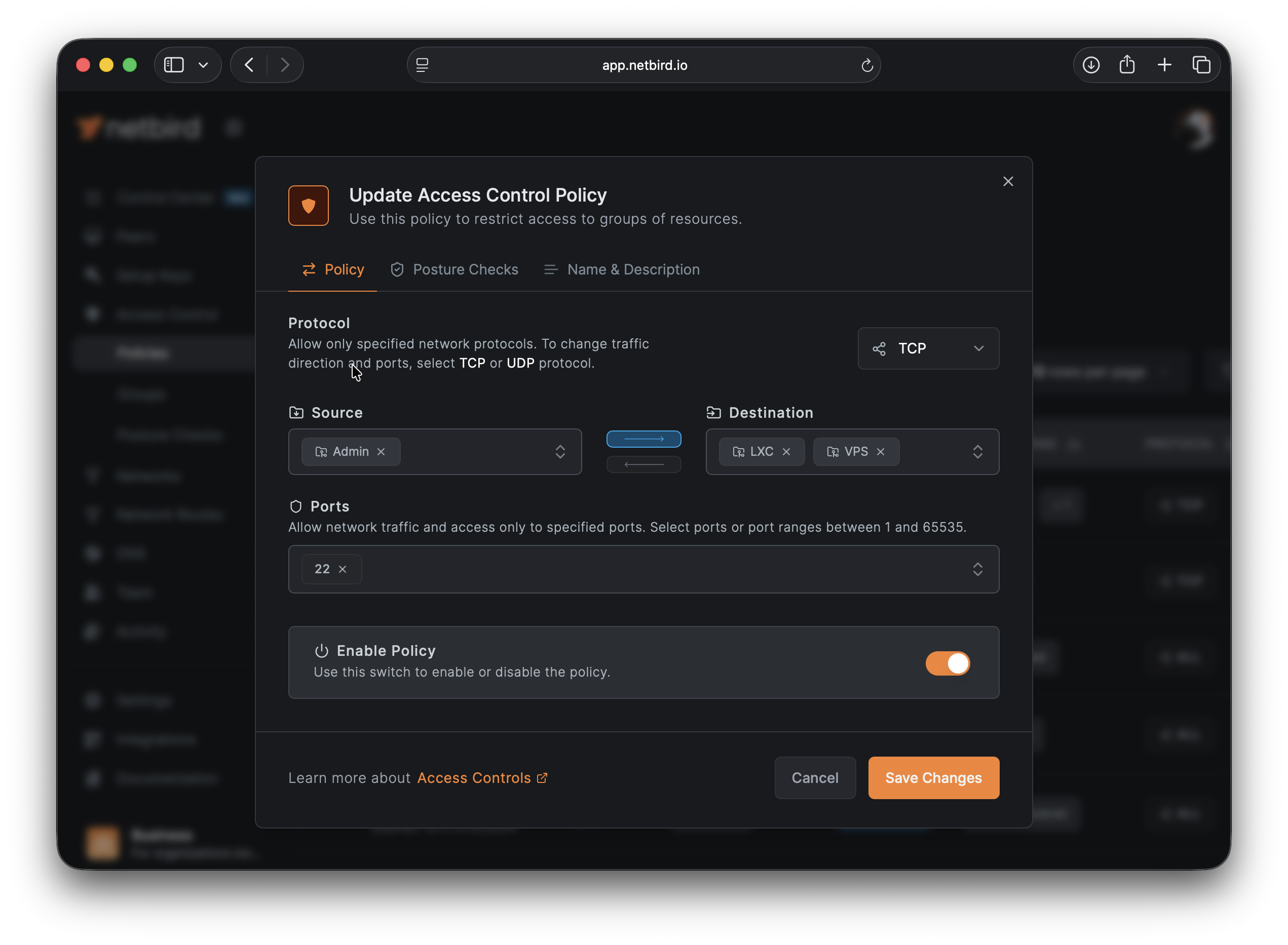
The new implementation requires explicit Access Control Policies that define:
- Which users or groups can connect
- Which servers they can access
- On which port (TCP/22)
- Under what conditions
This zero-trust approach ensures that network connectivity alone isn't sufficient for access—every connection must be explicitly authorized.
Business Impact: Simplifying User Lifecycle Management
Onboarding Made Seamless
When a new engineer joins your team:
- Old approach: Collect their SSH public key, determine which servers they need access to, manually add their key to each server's file, update documentation, and hope nothing was missed.
- New approach: Add them to the appropriate user group in your IdP and create or update an Access Control policy. They authenticate once via OIDC, and NetBird handles the rest automatically.
The new model scales effortlessly. Whether you're onboarding one person or fifty, the process remains consistent and automated.
Off-boarding Without Vulnerabilities
When someone leaves your organization:
- Old approach: Remember every server they accessed, SSH into each one, manually remove their key from , verify the removal, document the process, and worry about the servers you forgot.
- New approach: Disable their account in your IdP. Their SSH access terminates automatically across your entire infrastructure—immediately and completely, with no manual intervention required.
A single forgotten SSH key can become a security incident. With identity-based SSH, the surface area for this class of vulnerability essentially disappears.
Automation Systems Get First-Class Citizenship
Your Ansible playbooks, CI/CD pipelines, and automation scripts no longer need to live on machines physically near your infrastructure. They can run from anywhere in your NetBird network and reach any authorized target.
Need to deploy from a GitHub Actions runner to a server in your datacenter? Create an Access Control policy allowing the runner's peer access to your deployment targets on port 22. The automation executes as if the runner were local, but with all the security benefits of your zero-trust network.
Advanced Capabilities Unlocked
The new SSH implementation brings capabilities that were previously unavailable:
SFTP and SCP Support: Transfer files using the standard tools you already know:
Port Forwarding: Tunnel services securely through your SSH connection:
Non-Interactive Command Execution: Run commands without opening an interactive shell:
Cross-Platform Support: Full support across Linux, macOS, Windows, and FreeBSD. Your Windows machines can now run NetBird SSH servers, opening up previously inaccessible infrastructure to secure remote access.
Migration Path: What You Need to Know
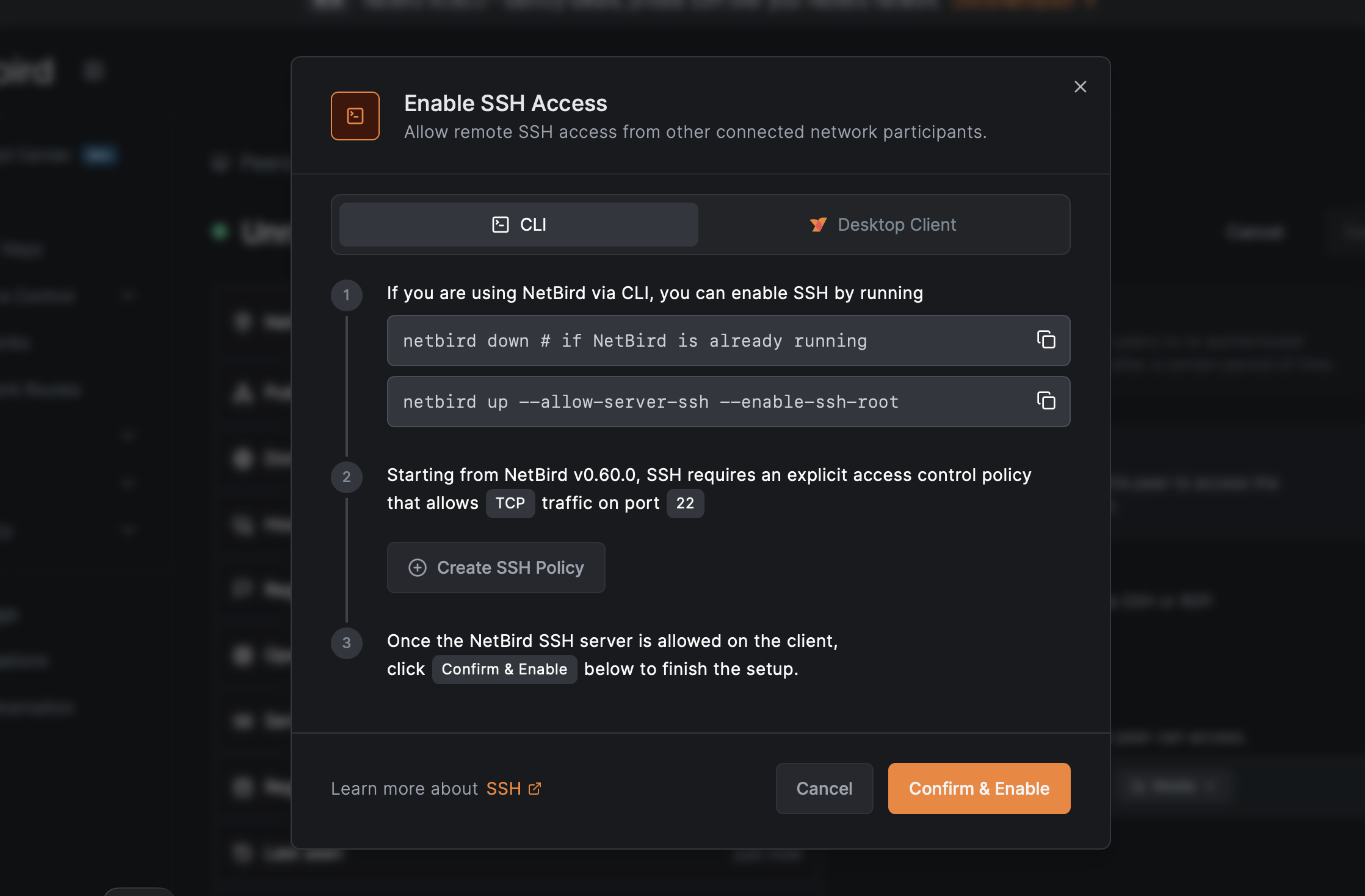
This is a breaking change. NetBird v0.60.0+ clients cannot connect to v0.59.x servers, and vice versa. However, the migration path is straightforward:
- Update your management server to v0.60.0
- Create Access Control policies allowing TCP port 22 between appropriate groups
- Update SSH server peers first (machines people connect to)
- Update SSH client peers last (machines people connect from)
The browser-based SSH client in the dashboard maintains backward compatibility during migration, ensuring continuous access throughout the transition.
For detailed migration steps and configuration options, see our SSH documentation .
Under the Hood: Technical Architecture
For those interested in the implementation details:
SSH Port Redirection: The remote peer's NetBird client seamlessly intercepts SSH traffic on port 22 and redirects it to port 22022, where the NetBird SSH service is listening. This allows standard SSH clients to connect without any special configuration.
JWT Token Flow: When connecting, NetBird requests a JWT token from your IdP via OIDC. The token is sent to the SSH server, which validates it against the JWKS (JSON Web Key Set) endpoint configured in your management server. Valid tokens establish SSH sessions authenticated with the user identity from the token.
OpenSSH Configuration: NetBird installs a drop-in configuration file () that automatically detects NetBird SSH servers and handles JWT authentication transparently—no manual SSH config editing required.
Flexible Authentication: While JWT authentication is recommended for most use cases, you can disable it () for scenarios requiring machine-based access (such as automation systems that don't have user identities). This maintains backward compatibility with existing workflows while making identity-based access the secure default.
Getting Started
Ready to experience the new SSH implementation? Here's the quick start:
- Upgrade to NetBird v0.60.0 or later on your management server and peers
- Enable SSH on target servers:
- Create an Access Control policy allowing TCP port 22
- Connect using native SSH:
On your first connection, you'll authenticate via your IdP. After that, SSH works exactly as you expect—because it is standard SSH, just secured by NetBird's zero-trust network and your organization's identity system. No learning curve, no new tools to master.
For advanced configurations including SFTP, port forwarding, and JWT caching options, check out our comprehensive SSH documentation .
- Try NetBird: Get started at netbird.io/pricing
- Learn more: Read the full SSH documentation
Join the community: